Privacy and Consent for Docket Marketing Agent
Last updated: October 21, 2026
Docket Marketing Agent can follow the cookie consent your website already collects. This article explains what consent changes, what Docket Marketing Agent stores in a visitor's browser, and which parts of the decision belong to your team. It is written for the person who has to answer a privacy or security review as much as for the person configuring the agent.
This is product documentation, not legal advice. Your privacy or legal team should decide which cookie category is appropriate for your site. For the steps to turn a consent platform on and choose a category, see Configuring Consent Management for Cookiebot and OneTrust.
What does consent actually control?
Consent controls what Docket Marketing Agent keeps about a visitor. It does not control whether the agent works.
When consent does not grant the category you nominated, Docket Marketing Agent does all of the following for that visitor:
It does not keep a durable identity, so the visitor is not recognised on a later visit.
It does not merge an email address into a stored person record.
It does not keep the conversation as context for later.
It does not personalize FAQ content for that visitor.
The agent loads, answers questions and books meetings whether or not a visitor has accepted cookies. What changes is continuity. A remembered visitor is recognised when they come back. A visitor who is not remembered starts fresh every time.
Your consent management platform (CMP) owns the question: the banner, its wording, the categories, which regions are asked, and the answer each visitor gives. Docket Marketing Agent owns the response, which is reading that answer for the one category you nominate and deciding whether to keep a durable identity. Your team owns the mapping between the two.
What changes for a visitor who is not remembered?
When a visitor is remembered, the agent can draw on what happened on their earlier visits. In practice that means a returning visitor can be greeted with continuity rather than as a stranger, and on-page callouts can refer to what they looked at before.
When a visitor is not remembered, they still get the full agent. They can ask anything, get answers from your knowledge sources and book a meeting. What they do not get is anything built from their history: the greeting and any callouts stay generic, FAQ content is not personalized for them, the conversation is not kept as context, and the next visit begins with no prior record of them.
This is the trade-off worth putting in front of your privacy reviewer. Consent gating costs you continuity for visitors who decline, and costs those visitors nothing in access.
What does Docket Marketing Agent store in the browser?
Docket Marketing Agent keeps two values in a visitor's browser. Both are first party, meaning they belong to your domain rather than to a third party.
Name | Where it lives | What it does |
|---|---|---|
| Cookie | Holds the visitor identity that lets the agent recognise a return visit. This is the cookie you classify in your CMP, and it is written only when consent grants the category you nominated. |
| Browser local storage | Helps the agent recognise the same browser, so a visitor who has consented can still be recognised if their cookie is lost. When consent is denied or withdrawn, Docket Marketing Agent clears this value, so the next visit produces a different identity that cannot be linked to the earlier one. |
Note the leading underscore on _docket_id. Automatic CMP scanners often miss it, because the agent sets it during a conversation rather than on page load, so you may need to add it to your cookie list by hand.
Docket Marketing Agent does not display a consent banner of its own, and it never signs in to your CMP. There are no credentials to exchange between the two products.
What happens before a visitor answers the banner?
The agent is available before the banner is answered. A visitor can open it and hold a full conversation without accepting anything.
_docket_id is not written while consent is unresolved. Until the CMP reports a grant for your nominated category, the conversation runs against an identity that is not stored in the visitor's browser, so nothing carries over to a future visit.
If the visitor then accepts, the identity is kept and the conversation continues uninterrupted. If they decline, the conversation still continues, and nothing durable is left behind.
Can a consent banner stop the agent loading altogether?
Yes, but that is your consent platform doing it, not Docket. It is the single most important distinction on this page, because the two behave very differently.
What is happening | Effect on the visitor |
|---|---|
Your CMP is set to hold the Docket script until consent is given | The agent does not load at all. The visitor sees no widget. |
Docket Marketing Agent’s own Consent Management setting | The agent loads and works normally. Only the durable visitor identity is gated. |
Consent platforms classify third-party scripts, and if the Docket script is placed in a category that requires opt-in, every visitor who declines or ignores your banner will see nothing. Teams often discover this as a sudden drop in conversations rather than as an error, and because most banners only appear in certain regions the effect can look inconsistent.
If that is what you want, nothing needs changing. If you would rather the agent were available to everyone and only the memory of them was gated, map the Docket script to a category that loads for all visitors, or allow it to load independently of consent, and use the Consent Management setting below to control identity instead.
How does consent reach Docket Marketing Agent?
Docket Marketing Agent reads consent from two platforms, Cookiebot and OneTrust. You enable a platform and nominate a cookie category per agent, under Agent then Widget then Consent Management. The Widget tab is mapped out in Understanding Widget Behavior and Access.
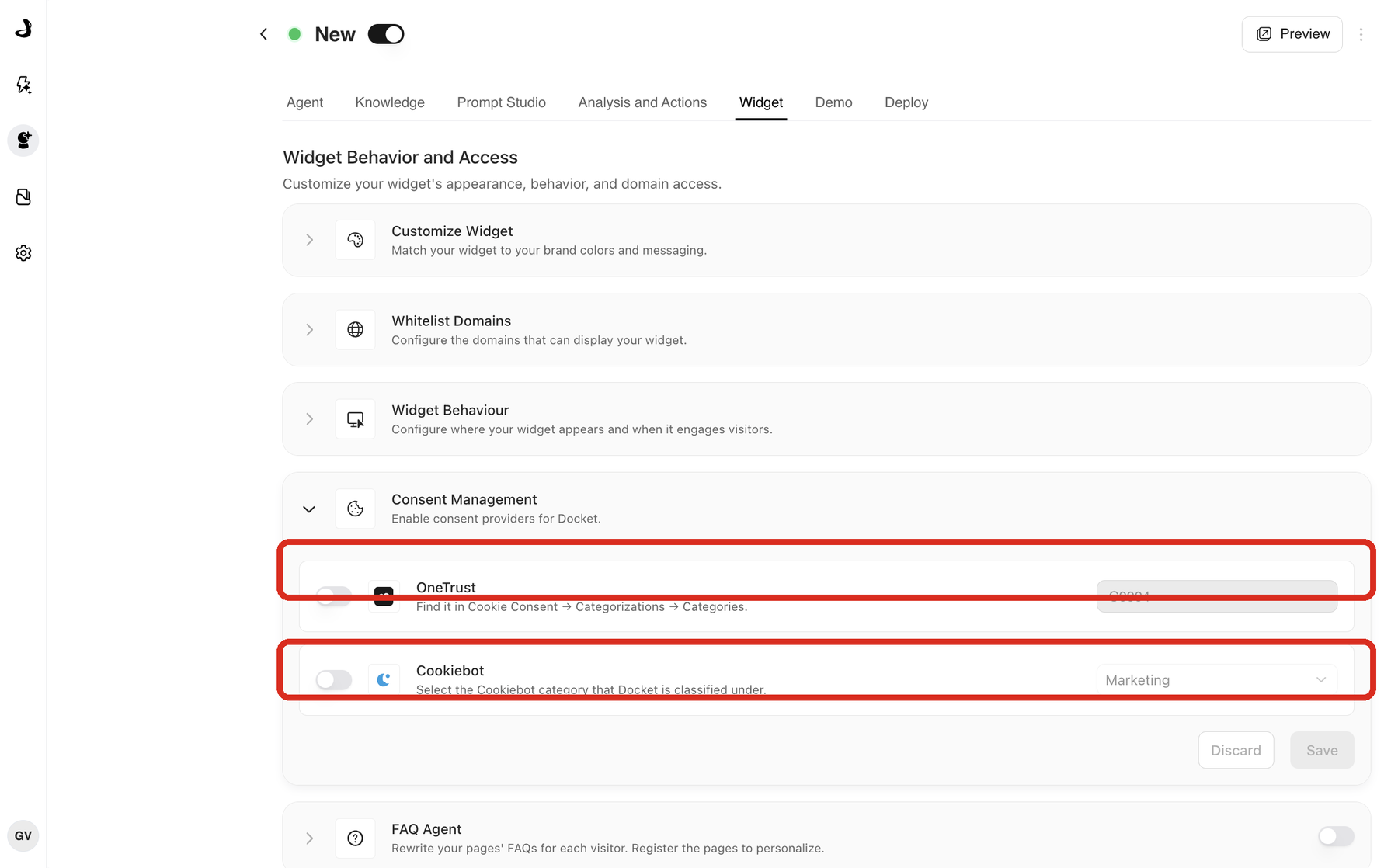
Because the setting belongs to the agent rather than the account, a company running several sites can point each agent at the platform and category that site actually uses.
The agent checks consent on every page load, and also listens for a change while the visitor is still on the page. If someone accepts or withdraws consent mid-visit, that takes effect without waiting for a reload.
If you enable no platform, Docket Marketing Agent remembers visitors exactly as it did before. Consent gating is optional, and a site with no CMP is unaffected. Docket Marketing Agent can also be configured not to use the visitor cookie at all; for that you can contact the Docket team.
How is Global Privacy Control treated?
Global Privacy Control (GPC) is a signal a visitor's browser can send on their behalf, asking every site they visit not to sell or share their personal information. It saves them clicking reject on each site individually.
When a browser sends GPC, Docket Marketing Agent treats it as a refusal and does not keep a durable identity, whatever the banner records. Both Cookiebot and OneTrust also respond to GPC in their own way, so your CMP settings and this behaviour work in the same direction.
Why do results vary by region?
Most CMPs only show a banner to visitors in the regions you choose, and visitors outside those regions are granted every category automatically. Cookiebot's distribution setting defaults to the EU and EEA, so a visitor browsing from elsewhere may never see a banner and will read as a full grant.
Two practical consequences follow. First, a test from the wrong location can look like consent gating is not working when it is behaving correctly. Second, in regions where visitors must opt in, an agent with consent gating on will recognise fewer returning visitors than the same agent with it off. That is the gating doing its job, not a fault to report.
What do withdrawal and deletion actually do?
Withdrawing consent stops Docket Marketing Agent collecting and using that visitor's data from that point on. It does not erase data already stored.
Deletion is a separate request. There is no self-serve way to delete a visitor's stored data today, so if someone exercises a deletion right with you, raise it with your Docket contact and it will be handled as a request.
Stated plainly for a privacy review: consent gating controls whether Docket Marketing Agent keeps a durable identity, links a visitor to a person record, retains the conversation as context, and personalizes content for them. It is not a blanket switch that stops all data collection, and it is not a deletion mechanism.
What should you check before you launch?
Work through this with whoever owns privacy for your site.
Decide with your privacy or legal team which cookie category
_docket_idbelongs in.Classify
_docket_idin your CMP under that category, adding it by hand if the scanner did not find it, and republish your banner.Enable the matching platform and category on every agent that needs it, remembering the setting is per agent.
Test with consent granted and confirm
_docket_idis present.Test with consent declined, and again with GPC enabled, and confirm
_docket_idis absent while the agent still answers.Check where your CMP shows a banner, so you know which visitors your test actually represents.
Add
_docket_idand__aiseller_client_idto your public cookie or privacy notice if your notice lists storage individually.
Troubleshooting
Issue | What to check |
|---|---|
Visitors are not recognised across sessions | Confirm the category selected on the agent matches the category |
Consent looks granted but identity still does not persist | Check that |
A visitor saw no banner and was remembered anyway | Check which regions your CMP shows a banner to. A visitor outside those regions can be granted every category automatically. |
A European visitor was not remembered | Expected if they did not accept your nominated category. In opt-in regions, fewer returning visitors are recognised while consent gating is on. |
You are unsure which settings apply | Consent settings belong to the agent, not the account. Open the agent deployed on that site and check its Consent Management section on the Widget tab. |
Related articles
Configuring Consent Management for Cookiebot and OneTrust
Frequently asked questions
Does declining cookies stop a visitor using the agent?
Not on Docket’s side. The agent still answers questions and books meetings. It simply does not keep a durable identity, so the next visit starts fresh. If a visitor sees no agent at all after declining, your consent platform is holding the script. Troubleshooting Widget Not Loading or Displaying covers how to confirm that.
Which cookie category should _docket_id go in?
That is your privacy team’s decision. Most teams treat a persistent visitor identifier as a marketing or targeting cookie, because it recognises the same person across sessions. Whichever you choose, the category you nominate on the agent has to match the one the cookie sits in inside your CMP.
Why can my CMP scanner not find the cookie?
Docket Marketing Agent sets _docket_id during a conversation rather than on page load, so an automatic scan of your homepage often misses it. Both Cookiebot and OneTrust let you add a cookie by hand. Note the leading underscore.
Do consent settings apply to my whole account?
No. They belong to each agent, so a company running several sites can point each agent at the platform and category that site actually uses.
Does a visitor have to reload the page after accepting?
No. The agent checks consent on page load and also listens for a change during the visit, so accepting or withdrawing takes effect on the page the visitor is already on.
We use a consent platform that is not Cookiebot or OneTrust. What happens?
Docket Marketing Agent reads consent from Cookiebot and OneTrust. With neither enabled it remembers visitors as it did before. Your platform can still control whether the Docket script loads at all, which is the separate mechanism described above.
Can we run the agent without the visitor cookie entirely?
Yes. Docket Marketing Agent can be configured not to use the visitor cookie at all. Contact the Docket team to set that up.
Does consent affect Contextual Callouts or the FAQ Agent?
Both work from visitor context, so a visitor you hold no context for sees page-based prompts and your original published FAQ rather than anything personalised. Neither feature changes what consent controls.