Contextual Callouts: Help Visitors Start the Right Conversation
Last updated: September 29, 2026
Contextual Callouts give each website visitor a relevant reason to open your Docket agent, without asking them to invent the first question.
Imagine Maya is evaluating your product. Her questions change as she moves from the overview to pricing, integrations, or implementation, but a generic "How can I help?" treats every moment as identical.
Contextual Callouts consider the page Maya is viewing, the section she has reached, and the visitor context Docket already has permission to use. They then display one or two short, AI-generated conversation starters beside the Docket agent.
A callout is the doorway, not the answer.
Maya may see:
Compare the options for my rollout
Selecting it opens the agent, skips the generic welcome message, and sends a fuller question:
Help me compare the available options and understand which one fits a multi-region rollout.
The agent answers from its configured knowledge and actions, so Maya starts from her intent instead of a blank chat box.
How the experience unfolds
1. Docket reads the current moment
When Contextual Callouts are enabled, Docket combines the public page and active section, permitted session or visitor context, and the agent's purpose, knowledge, and capabilities. Missing optional context is left out. Personalization stays soft outside the agent and should not expose private, sensitive, or surprising details. Deeper context can be used after Maya engages, subject to your configuration and consent model.
2. Docket prepares page-grounded callouts
Callouts are generated for the current moment, not selected from a fixed library. Generation takes about five to six seconds after the widget appears. If the page cannot be read, generation fails, or no useful prompt is available, Docket leaves the surface empty while the agent remains available.
Docket can prepare three types of callouts:
Situational callout: Starts a conversation about what Maya is reading on the current page or section. It appears without a pulsing dot.
Capability callout: Invites Maya to use something the agent is configured to help with, such as a relevant next step or action. A green pulsing dot identifies it.
Exit-intent callout: Offers one final, page-level invitation when a desktop visitor appears ready to leave. A red pulsing dot identifies it.
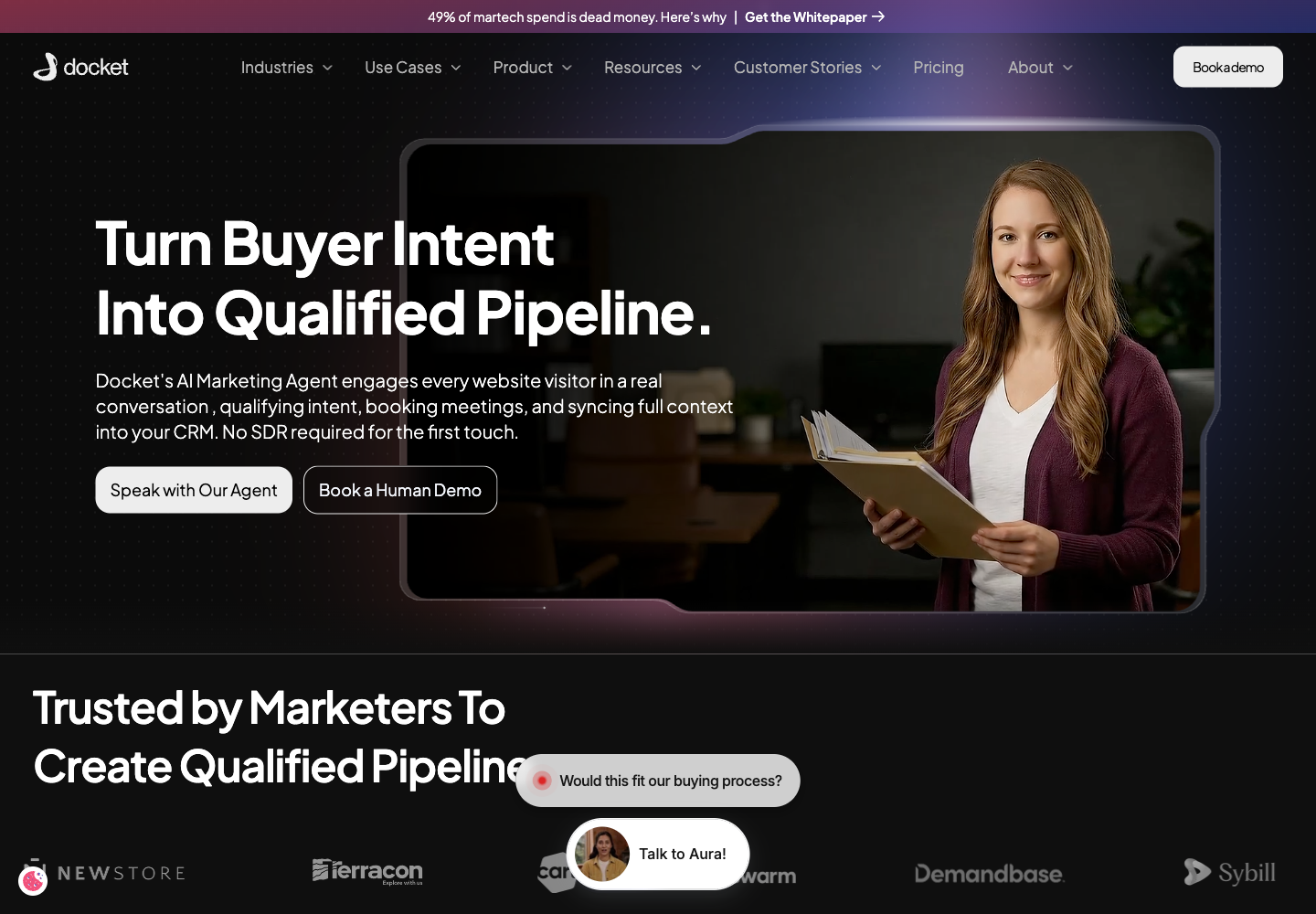
Figure 1. An exit-intent callout
3. The callouts follow Maya's attention
A situational or capability callout can be associated with a page heading. As Maya scrolls, Docket shows the latest relevant section callout and can keep it visible after the heading moves off screen. Desktop can show up to two callouts; mobile shows one.
After Maya reaches MQL Is Broken. AQL Is the Fix., the page does not reload. The active section changes, so the callouts change with it.
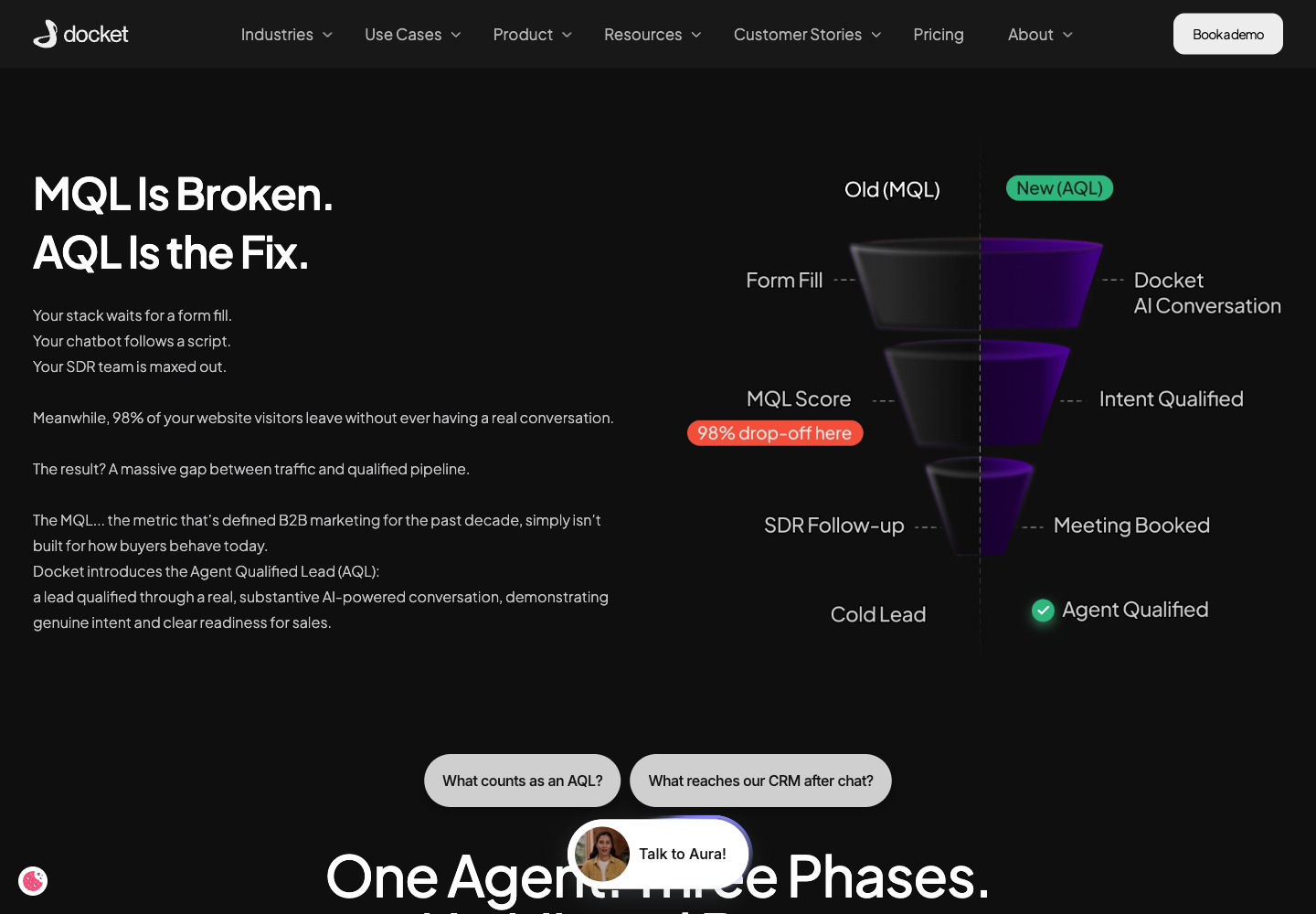
Figure 2. The AQL section shows "What counts as an AQL?" and "What reaches our CRM after chat?"
Exact wording can vary with the page, visitor, session, and agent configuration.
4. Maya chooses a callout
Each visible callout has an expanded prompt behind it. Maya selects:
How does Docket qualify buyers?
Docket submits:
How does Docket qualify website visitors and decide when someone becomes an Agent Qualified Lead instead of just another MQL?
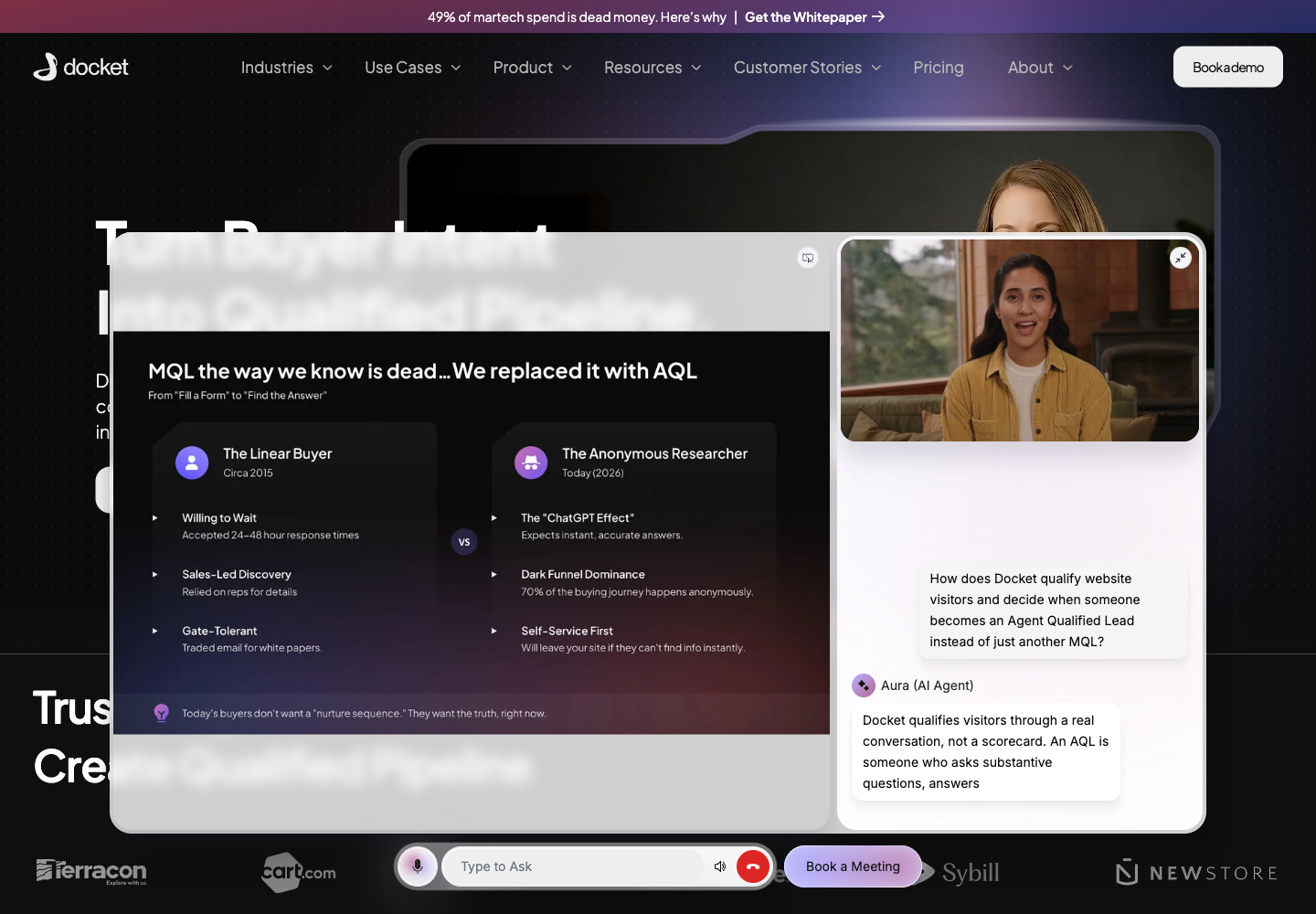
Figure 3. Selecting the callout opens the agent and submits the expanded prompt without asking Maya to retype or send it.
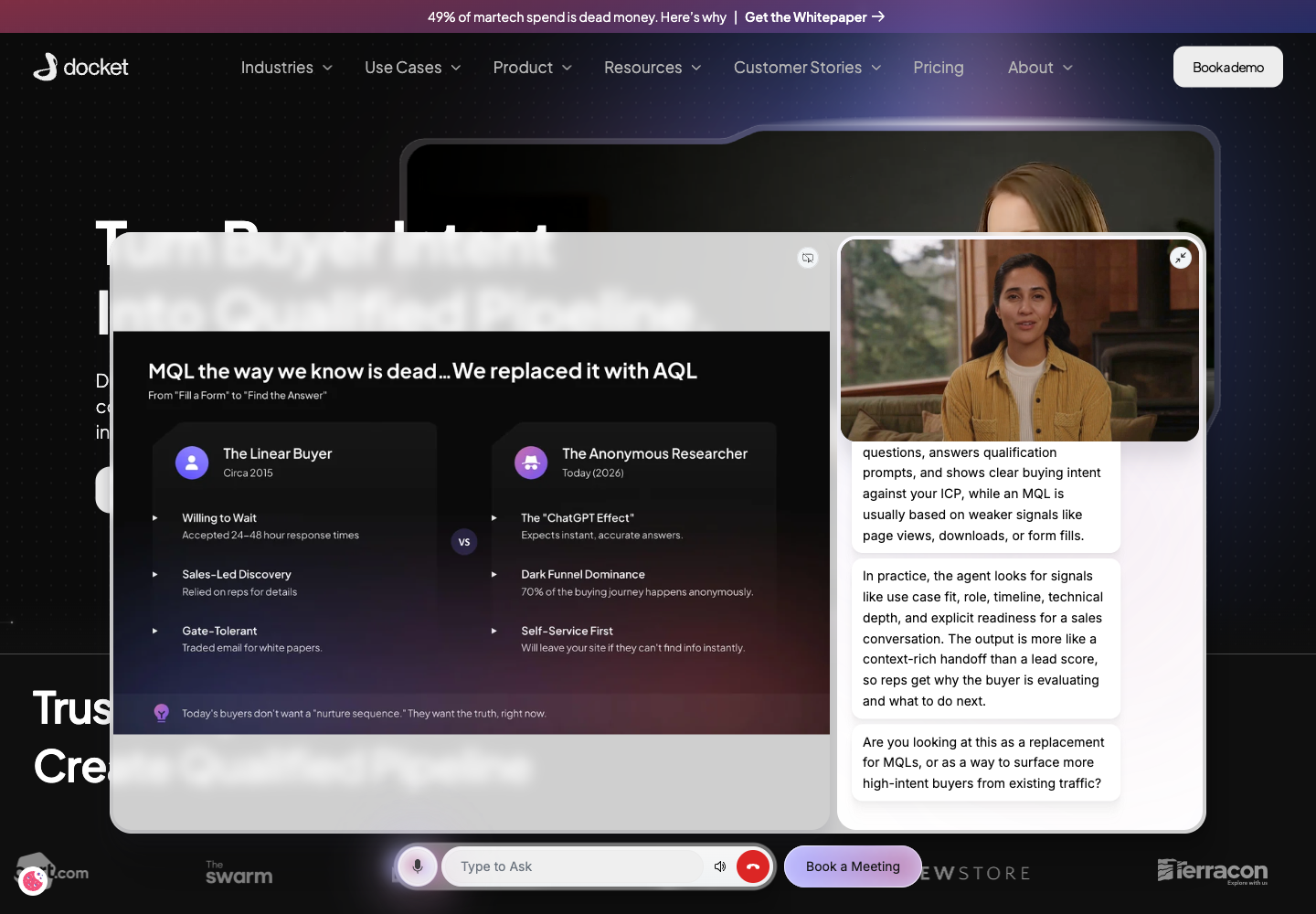
Figure 4. The agent answers the submitted prompt and can continue with a relevant follow-up.
Once Maya connects, callouts and browser-tab re-engagement stop.
Re-engagement before Maya connects
Scrolling is the first re-engagement moment. Docket can also respond when the page moves into the background or Maya appears ready to leave.
When Maya opens another browser tab
While the page is in the background and Maya has not connected, Docket can rotate contextual tab titles such as Meet more ready buyers, Turn traffic into pipeline, and See what gets synced to CRM. The original title returns when she comes back or the behavior stops.
When Maya appears ready to leave
On desktop, a fast pointer movement through the top of the viewport can trigger one page-level exit-intent callout, replacing the active section callout with a final invitation:
What gets logged in the CRM?
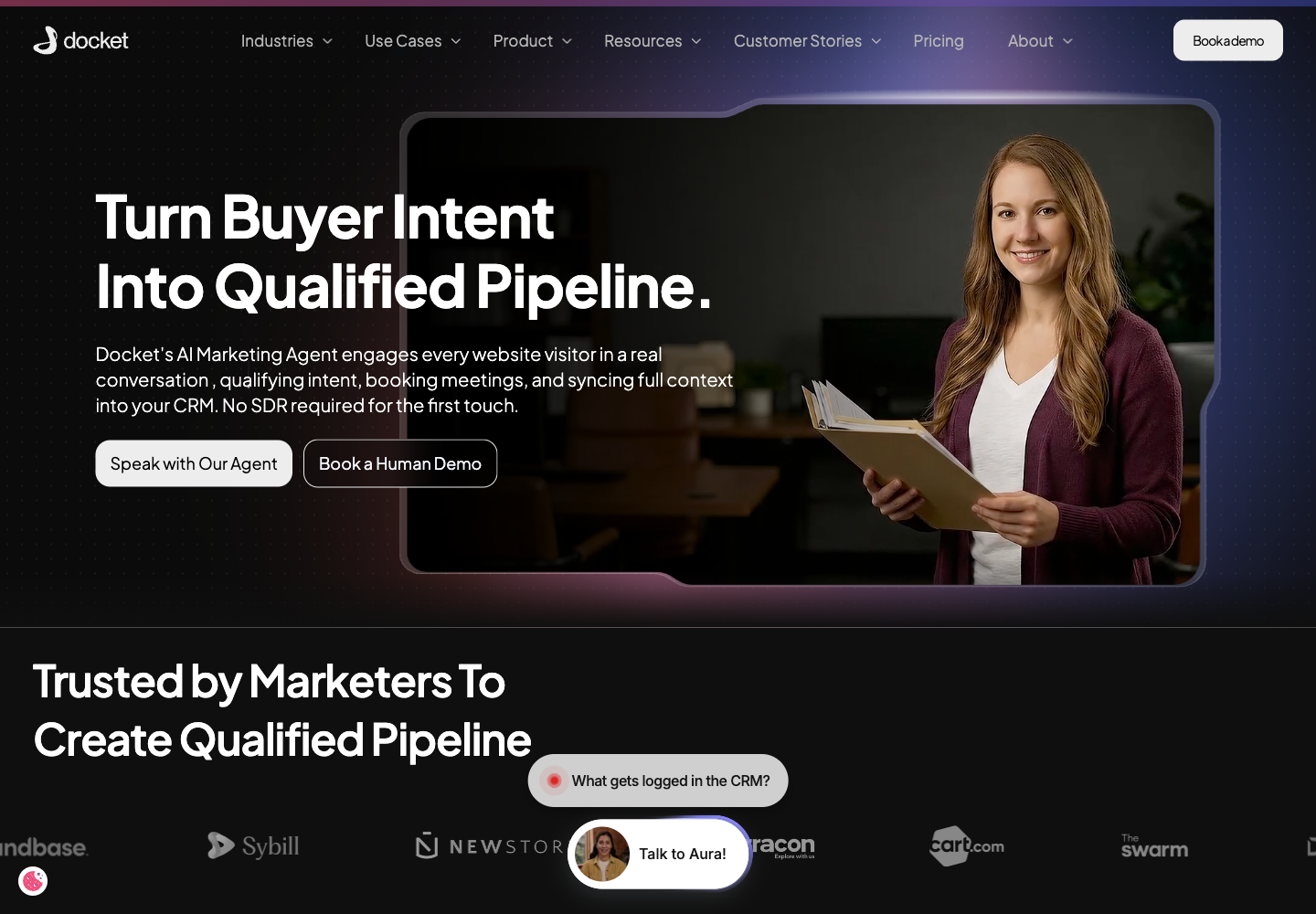
Figure 5. The exit-intent callout appears when the desktop pointer leaves the viewport quickly.
Selecting it submits its expanded prompt:
What exactly gets synced into Salesforce or HubSpot after a Docket conversation, including qualification details, pain points, and next steps?
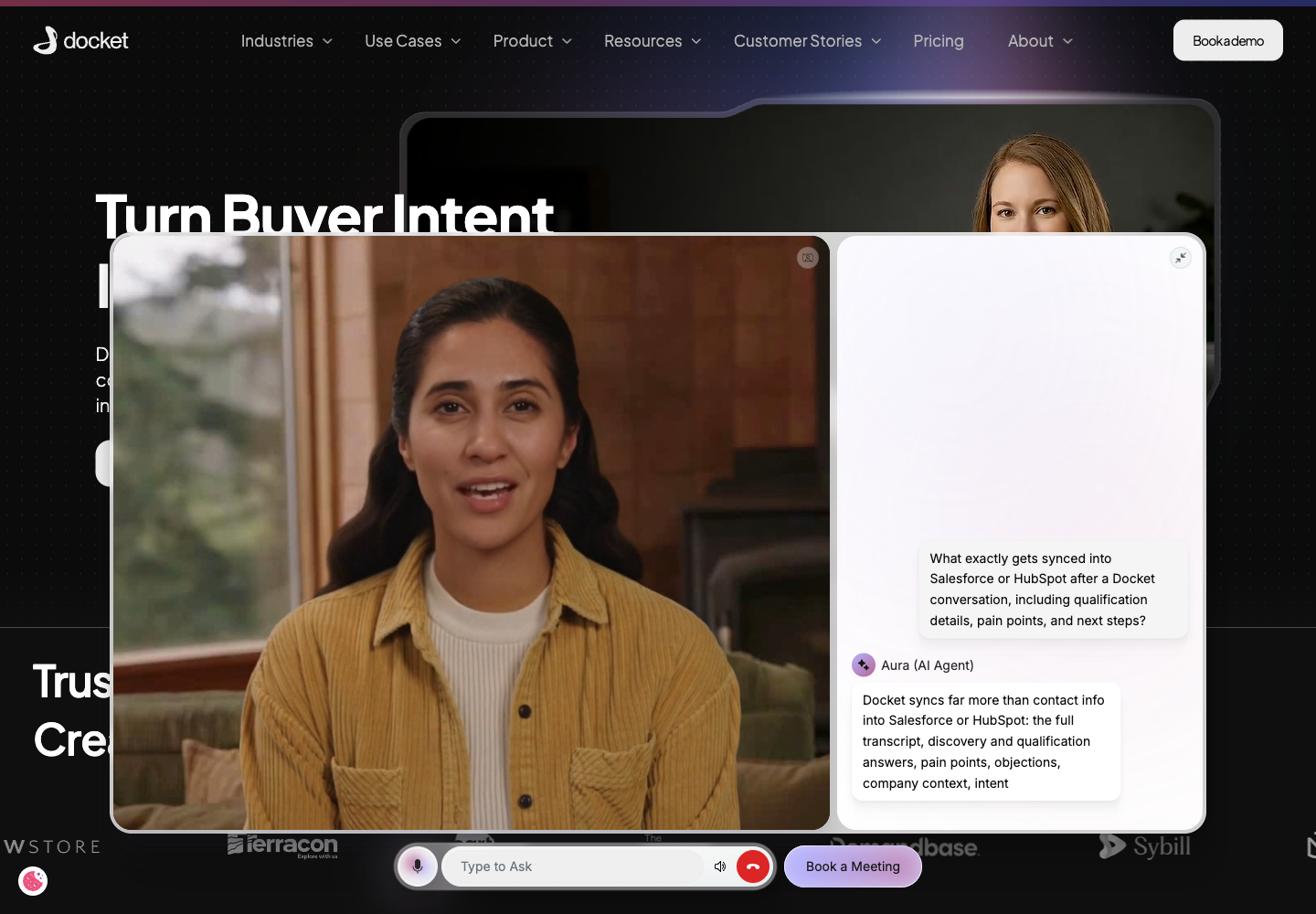
Figure 6. The exit-intent callout becomes a fuller CRM question inside the agent.
If Maya keeps scrolling, the exit state clears. If she closes the callout, it is not immediately shown again for the same page moment.
Controls and edge cases
Closing a callout hides the current set for that page moment. The agent remains available, and a page change or reload can make new callouts eligible.
Showing a callout does not create a lead, book a meeting, or start a human handoff. Those actions occur only if Maya proceeds through the agent and the relevant capability is configured.
No callout can be the correct outcome when Docket cannot produce a safe, grounded invitation. It does not mean the agent is unavailable.
How are Contextual Callouts different from the callout trigger on the Widget tab?
They are two different things with similar names. Contextual Callouts are the AI-written prompts described on this page, and their wording is generated from the page a visitor is reading. The When to trigger a callout setting inside Widget Behaviour is a simpler control that only decides when a prompt may appear, using Time Spent On Page or Page Scroll.
If you are looking for a place to write callout copy yourself, there is not one. See Configuring Widget Behavior and Page Targeting Rules for the timing control.
What can you control, and what is set by Docket?
You control whether the agent is deployed on a page at all, what it knows, and which actions it can offer. Docket controls how each callout is worded and which moment it is shown, because both are generated per visitor.
Two limits are worth knowing before you plan around the feature. Callouts cannot be scoped to particular page types or audiences, so an agent deployed across a site may show callouts on pages you would not have chosen. The browser-tab re-engagement behaviour also has no per-account setting to edit or switch off. If either matters for your site, raise it with the Docket customer team.
What is needed before enabling the feature?
Required: The Docket agent is installed, Contextual Callouts are enabled for the correct agent, and target pages are publicly reachable with enough readable text.
Conditional: Current Knowledge Sources help the agent answer well. Configure meeting booking or human handoff only when callouts should introduce those actions. Dynamic Context and visitor enrichment are optional and should follow your consent and data-use model.
Launch check: Test one desktop and one mobile journey. Confirm callouts change with the page, open the expanded prompt, and lead to an answer or configured action. On desktop, also check browser-tab titles and exit intent.
Contextual Callouts are switched on for agents by default, so in most cases there is nothing to enable. To have them turned off for an agent, or to talk through where they should and should not appear, contact the Docket customer team with the agent name and website domain.
Frequently asked questions
Do I need to turn Contextual Callouts on?
No. They are enabled for agents by default. If you would rather an agent did not show them, ask the Docket customer team to switch them off for that agent.
Can I write the callout text myself?
No. Each callout is generated for the page and visitor in the moment, so there is no library of phrases to edit. You shape them indirectly, through the agent's knowledge, purpose and configured actions.
Why did a callout appear on a page where it does not fit?
Callouts follow the page a visitor is reading and cannot be limited to particular page types or sections of a site. If an agent is deployed across a whole domain, its callouts can appear anywhere on that domain. Narrowing where the agent itself appears is the way to control this, using Selected Pages.
How long do callouts take to appear?
About five to six seconds after the widget is displayed. After a visitor engages with the agent, the next set follows about two and a half minutes later, and reloading the page resets that timer.
Can I stop the browser tab title from changing?
There is no per-account setting for it today. The title rotates only while the tab is hidden and the original returns when the visitor comes back, and the page description is never changed. If you need it disabled, raise it with the Docket customer team.
Do callouts work on mobile?
Yes, with one callout shown at a time rather than two. Exit-intent callouts are desktop only, because they depend on pointer movement.
Does showing a callout create a lead?
No. A callout is an invitation. A lead, meeting or handoff only happens if the visitor opens the agent and the relevant capability is configured.
Why does a visitor sometimes see no callouts at all?
That is a valid outcome. If the page cannot be read, or no useful prompt can be grounded in it, Docket leaves the space empty and the agent stays available. Visitors who have already connected stop seeing callouts too.
Do callouts respect cookie consent?
They follow the same visitor context rules as the rest of the agent. A visitor you hold no context for gets page-based prompts rather than anything drawn from previous visits. See Privacy and Consent for Docket Marketing Agent.