Understanding Active, Draft, and Disabled Agents
Last updated: September 17, 2026
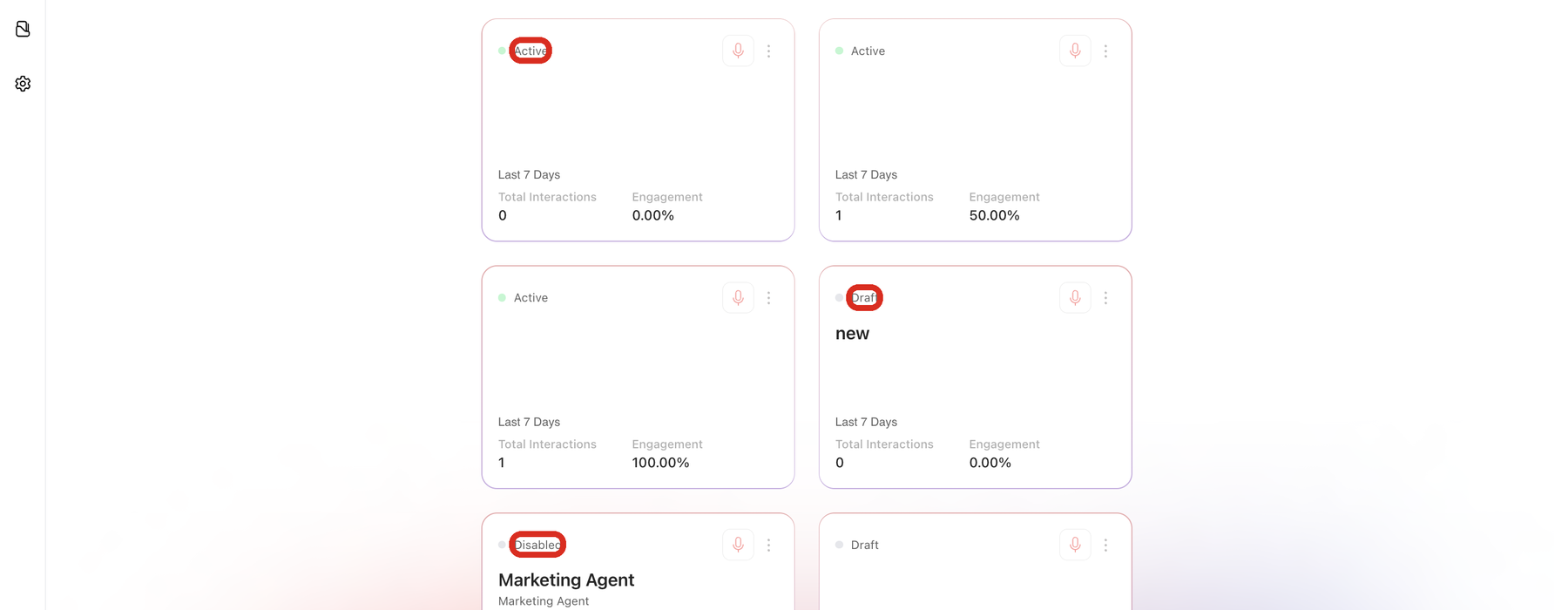
Every agent on the Agents page carries a status in the top-left corner of its card. The status tells you one thing: whether this agent is switched on and able to talk to visitors.
Knowing which status an agent is in explains most of the questions that come up during setup, including why a brand-new agent has no metrics yet and why some controls only appear on certain agents.
What do Active, Draft, and Disabled mean in Docket?
Docket shows three agent statuses.
Status | What it means | What to do next |
|---|---|---|
Draft | The agent has been created but has never been switched on. It cannot talk to visitors. | Finish the setup, then switch the agent on when you are ready to test and deploy it. |
Active | The agent is switched on. It can answer visitors on any page where its script is installed, and you can preview it. | Preview it, deploy it, and watch its results in the Marketing Agent Dashboard. |
Disabled | The agent was switched on before and has since been switched off. It keeps its configuration and its past conversations, but it does not answer visitors. | Switch it back on when you want it running again, or leave it off and keep the history. |
What is the difference between a Draft agent and a Disabled agent?
The difference is history. A Draft agent has never been switched on, so it has no conversations behind it. A Disabled agent has been on at some point, so it keeps whatever it recorded while it was running.
Both are off, and neither will answer a visitor. If you are looking for an agent that used to work on your site and has stopped, Disabled is the status to look for.
How do you make an agent active in Docket?
Open Marketing Agent Configuration from the left sidebar.
Select the agent from Your Agents.
Switch on the toggle beside the agent name in the header.
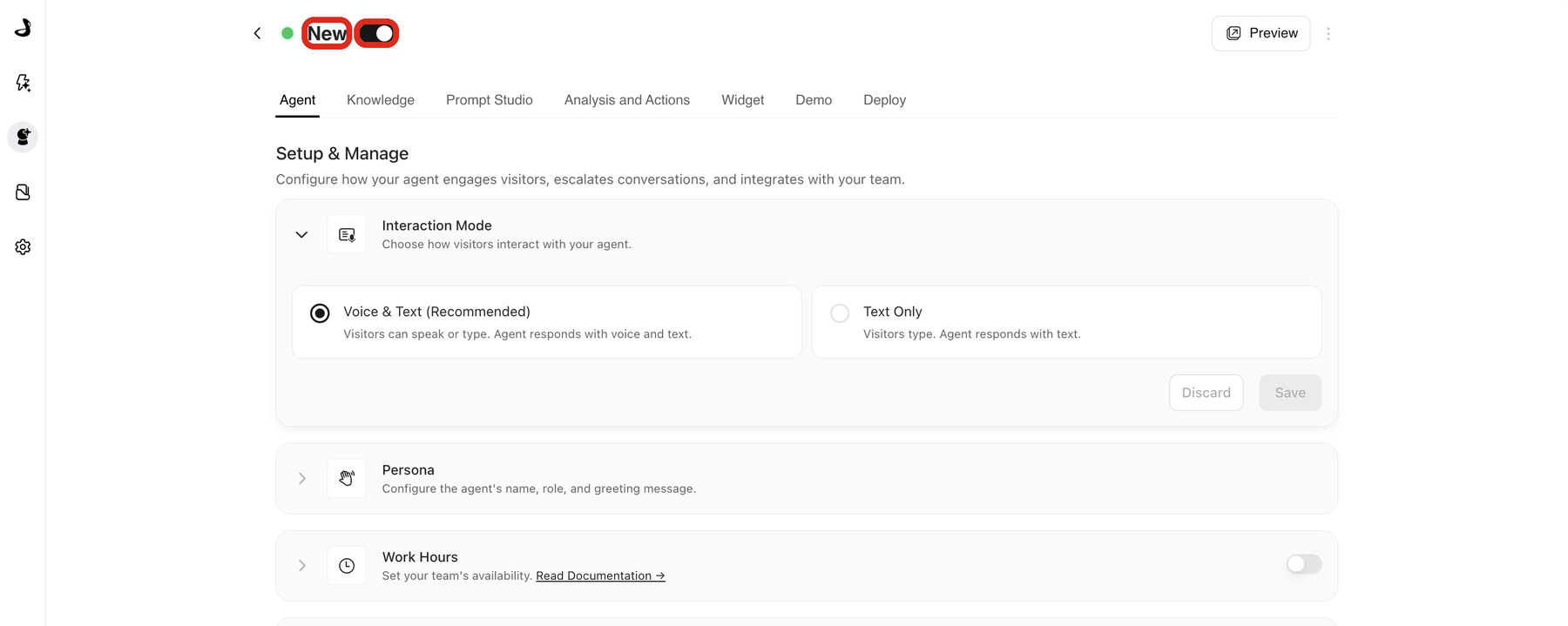
The same toggle switches an agent off again, which moves it to Disabled.
Does making an agent active put it on your website?
No. Switching an agent on and putting it on your website are two separate steps. An agent reaches visitors only on pages that carry its widget script, which you copy from the Deploy tab. An active agent with no script anywhere is switched on but has nowhere to appear.
That separation is useful: you can switch an agent on, test it privately, and add the script later. See Deploy a Marketing Agent.
What can you do with a Draft agent?
You can configure everything. All the tabs are available on a draft agent, so you can write its instructions, select its knowledge, set up its actions, style the widget, and copy its script.
The one control that waits is Preview, which appears in the header once the agent is active.
Troubleshooting agent status in Docket
Issue | What to check |
|---|---|
You expected an agent to be live but it still shows Draft | The toggle beside the agent name has never been switched on. Switch it on, then confirm the agent's script is on your pages. |
An agent that used to answer visitors now shows Disabled | Someone switched the toggle off. Switch it back on; the configuration and past conversations are unchanged. |
The agent shows Active but does not appear on your website | Check that the agent's own script is installed on that page, and review the allowed domains and page-targeting rules on the Widget tab. |
You cannot find an agent in the list | Clear the Search agents field and scroll the full Your Agents list. Archived agents no longer appear here. |
Metrics on the card look empty | The card covers the last seven days only. Open the Marketing Agent Dashboard for a wider range. |
Frequently asked questions
Does switching an agent off delete anything?
No. A disabled agent keeps its configuration and its conversation history. Switching it back on restores it exactly as it was.
Does a disabled agent still count towards my agent limit?
No. Your workspace limits how many agents can be Active at once, so draft and disabled agents do not count. Switching an agent off frees a slot for a new one.
Is Disabled the same as archived?
No. A disabled agent still appears on the Agents page and can be switched back on at any time. Archiving is a separate, permanent action at the bottom of the Agent tab. See Archiving and Managing Agent Lifecycle.
What status does a brand-new agent start in?
Draft. Every newly created agent, including a cloned one, starts as a draft so that nothing reaches visitors before you are ready.
Can I have more than one active agent at the same time?
Yes. Most teams run several, each pointed at a different page or audience. See Configuring Docket's Multi-Agent Platform.
Why can I preview one agent but not another?
Preview appears only on active agents. The agent without a Preview button is in Draft or Disabled.
Will switching an agent off remove it from my website?
The agent stops answering visitors, but its script stays on your pages until you remove it. Switch the agent back on and it starts answering again with no change to your site.
Where do I see which status an agent is in?
On the Agents page, in the top-left corner of each agent card, and in the header once you open the agent.
Have questions?
For any further assistance or troubleshooting, please reach out to our customer support team at support@docketai.com.