Setting up Marketo integration for Docket Marketing agents
Last updated: September 23, 2026
Set up Marketo once, then choose per agent what Docket writes back: Lead updates, custom activities, and program enrollment, with UTM attribution carried end to end.
The Docket and Marketo integration writes Marketing Agent activity into Marketo as custom activities, updates the Lead record, and enrolls visitors in the programs you choose. Three short steps in Marketo come first, then a one-time connection, then the write-back settings on each agent.
What do I need before connecting Marketo?
Have these ready before you start:
Admin access to Marketo Engage, with permission to create API users, roles, and channels.
The Admin role in Docket.
Your Marketo Munchkin Account ID, found under Admin then Munchkin in Marketo.
Room in your daily API quota, which defaults to 50,000 calls a day, alongside your other integrations.
Room for two more custom activity types, since Marketo caps how many an instance can hold.
If your Marketo instance requires a tag whenever a program is created, create a program named Docket Engagement by hand first. Docket reuses an existing program instead of creating a duplicate. Docket reuses that program when it connects.
How do I prepare Marketo for Docket?
Three things have to exist in Marketo before the connection will complete: a channel, a role, and an API user.
Create the Docket channel in Marketo
Marketo does not allow channels to be created through the API, so this one is manual.
In Marketo, go to Admin then Tags.
Under Channels, select New Channel.
Set Channel Name to
Docket, spelled exactly like that, and set Applicable Program Type to Default.Add two progression statuses in this order:
Engaged, thenMeeting Booked. Give Meeting Booked a higher step value than Engaged.
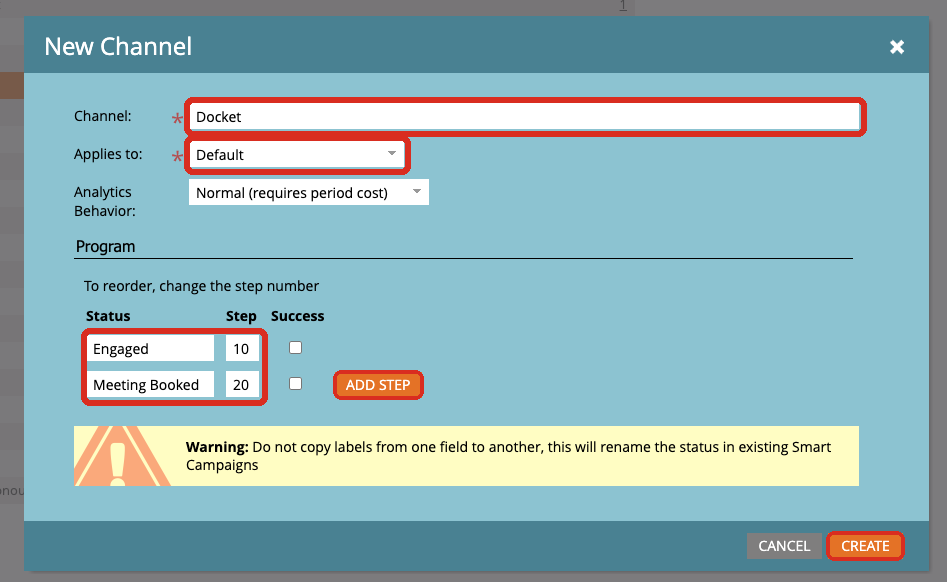
Save the channel.
Docket attaches every conversation and booked meeting to a program tied to this channel. If the channel is missing or a status name does not match, the connection reports: "The Docket channel does not exist in Marketo. Please refer to the integration guide for prerequisites."
Create a Marketo role for Docket
A dedicated role keeps the permissions auditable.
Go to Admin then Users & Roles then Roles, and select New Role.
Name it
Docket API Role.Grant Access API, Access Database, and Access Marketing Activities, each with all permissions.
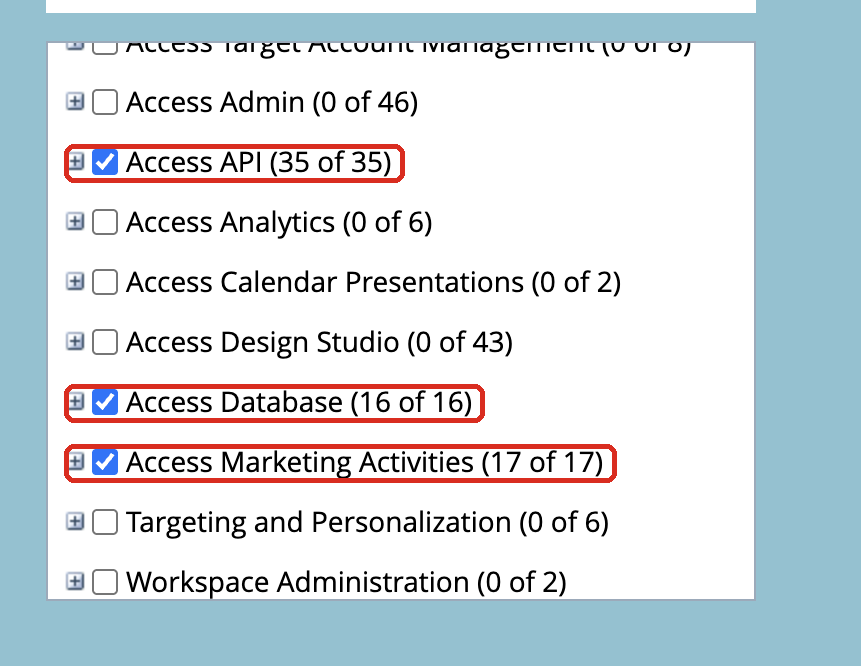
Save the role.
If one of these is missing, Docket names the missing scope when the connection fails.
Create an API-only user and a LaunchPoint service
Go to Admin then Users & Roles then Users, and select Invite New User.
Enter an address such as
docket-api@yourcompany.com, assign the Docket API Role, and select API Only.Send the invitation and accept it.
Go to Admin then LaunchPoint, and select New then New Service.
Set Display Name to
Docket, set Service to Custom, and choose the API-only user you just created.Save the service, select View Details, and copy the Client ID and Client Secret.
How do I connect Marketo to Docket?
With the Marketo pieces in place, the Docket side takes one step.
In Docket, open Settings and select the Integrations tab.
Find the Marketo card and select Connect.
Enter your Munchkin Account ID, for example
123-ABC-456, along with the Client ID and Client Secret from the LaunchPoint service.
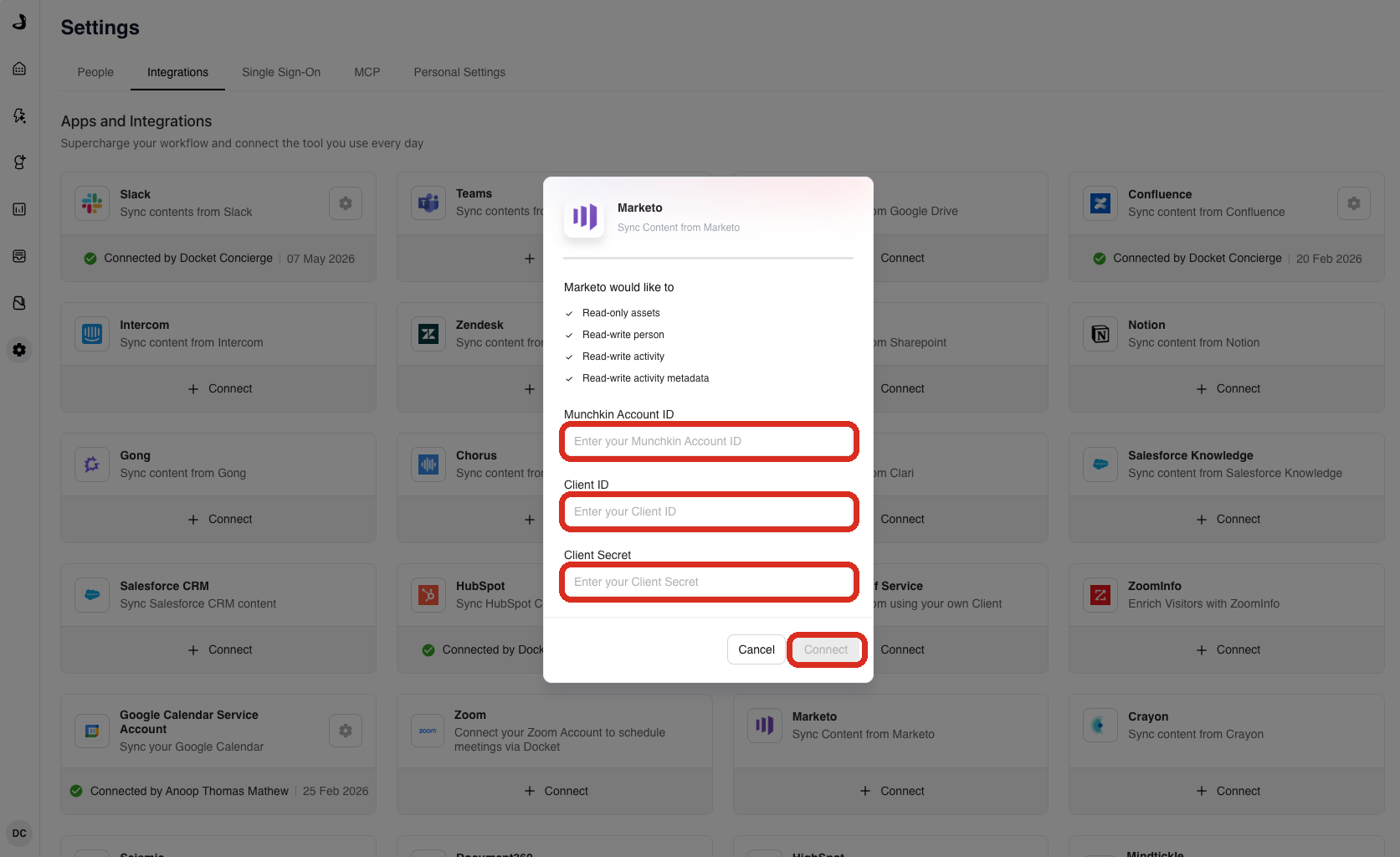
Select Connect.
What happens when the connection succeeds?
Docket sets up its own workspace inside Marketo on the first successful connection:
A folder named Docket, described as "Created by Docket. The Docket Engagement program will be used to track all interactions with Docket Agents."
A program inside it named Docket Engagement, of type Default, on the Docket channel. If the program already exists, Docket adopts it rather than creating a duplicate.
Two custom activity types: Docket Conversation and Docket Meeting Booked.
The program appears in Marketo within about two minutes. Its channel and type cannot be changed afterwards, so check the channel name carefully before you connect.
How do I let Docket read Lead data from Marketo?
Importing Lead data lets an agent recognize a known visitor and personalize the conversation. It is set on the Marketo card and is separate from write-back.
On the connected Marketo card, select the gear icon, then select Settings.
In Marketo configuration, under Data Access, turn on Import for Lead.
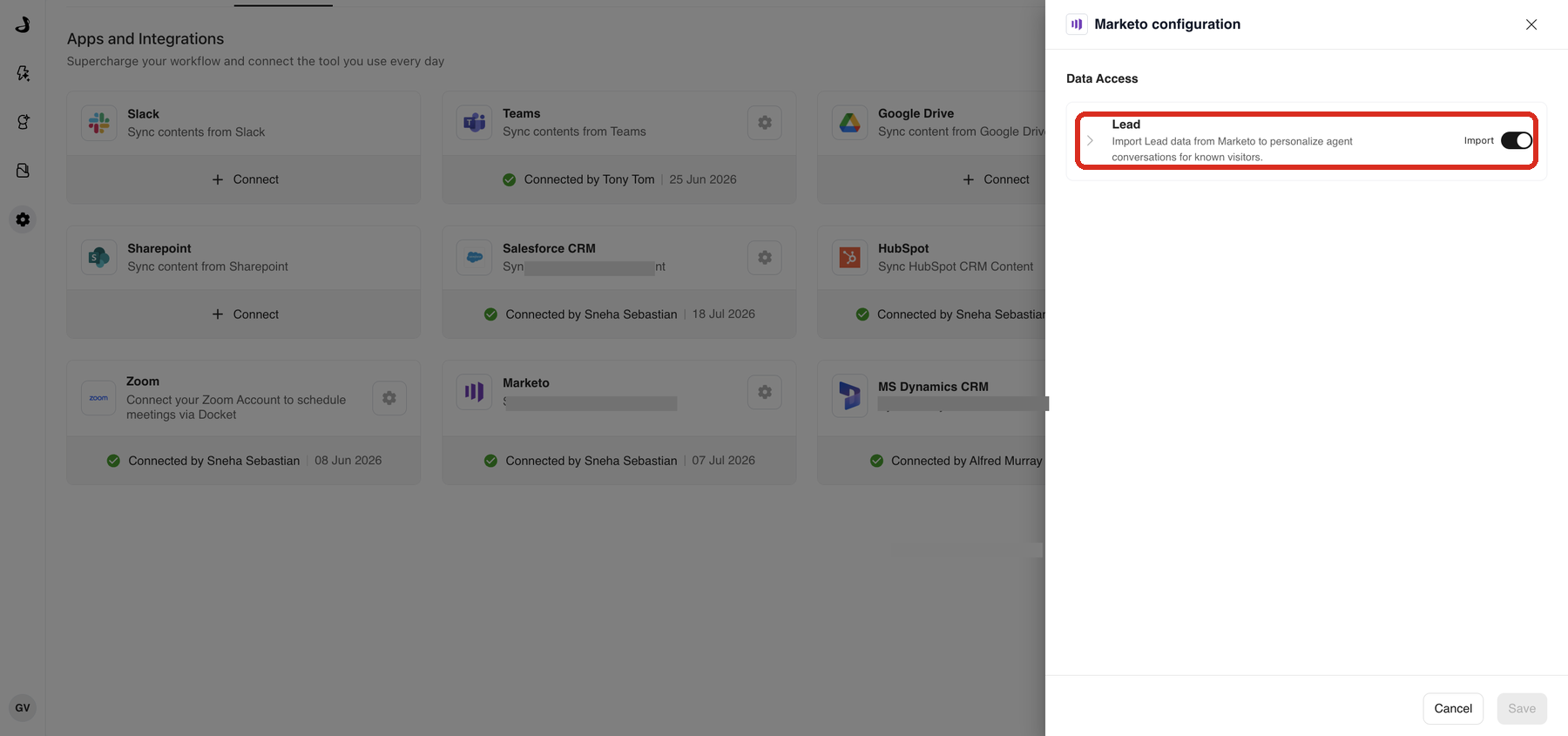
Select Save.
How do I turn on Marketo write-back for a Marketing Agent?
Write-back is configured on each agent, so you can roll it out gradually. Changes to one agent do not affect the others.
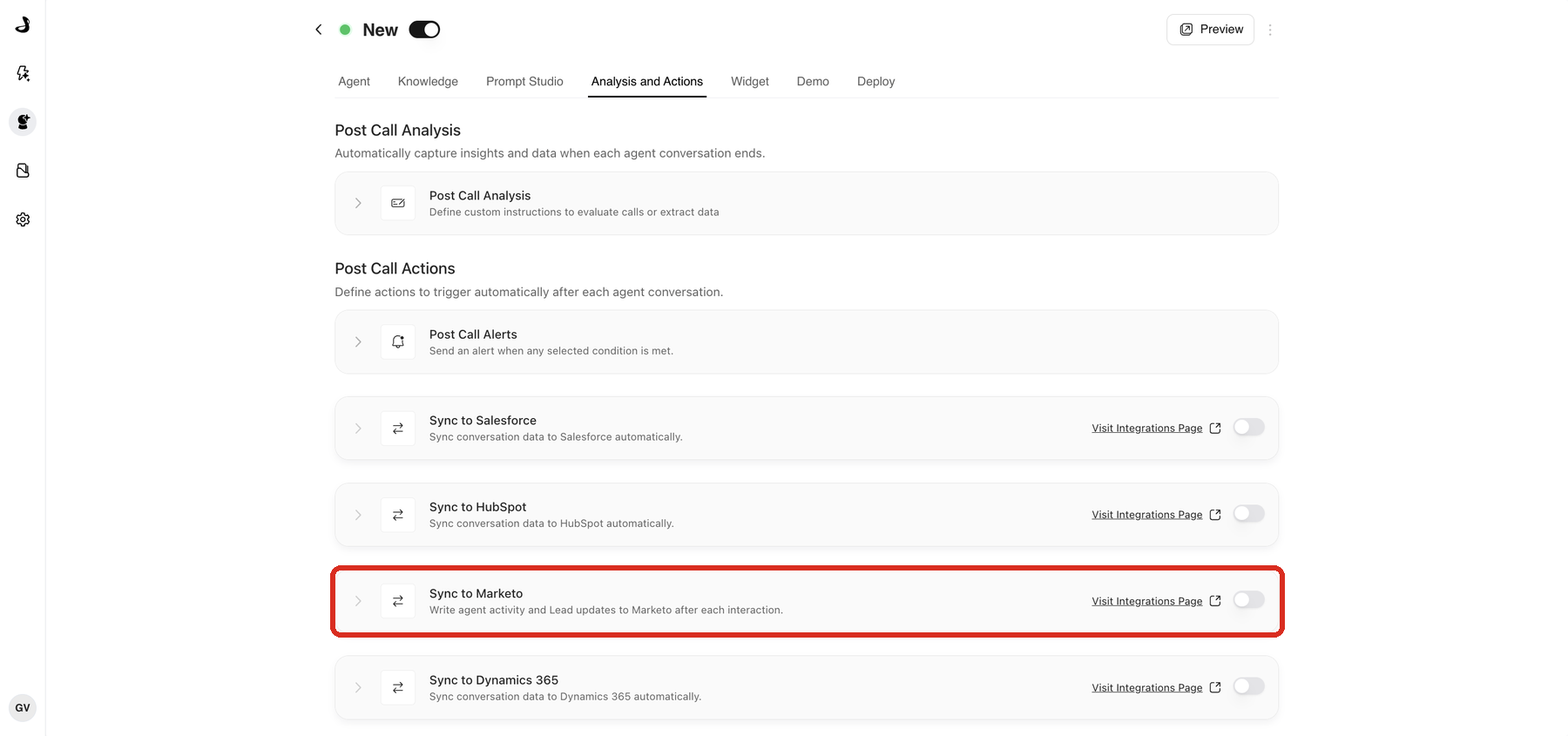
Open the Marketing Agent and select the Analysis and Actions tab.
Under Post Call Actions, turn on Sync to Marketo.
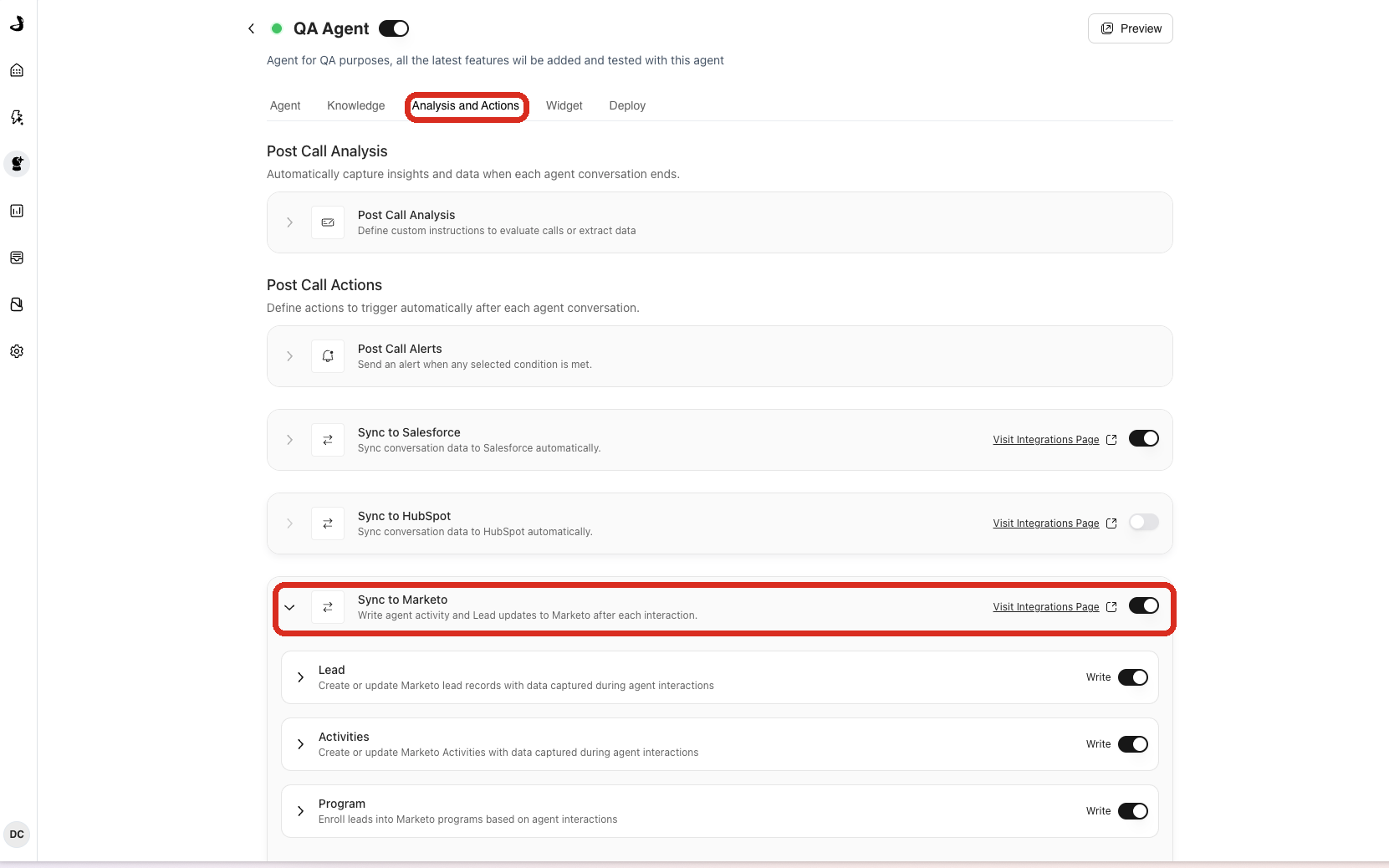
Expand Sync to Marketo and turn on the parts you want:
Lead sync creates new Leads or updates existing ones from Docket conversations.
Activities writes the Docket Conversation and Docket Meeting Booked custom activities.
Program enrollment enrolls a Lead in a Marketo program when your trigger criteria are met.
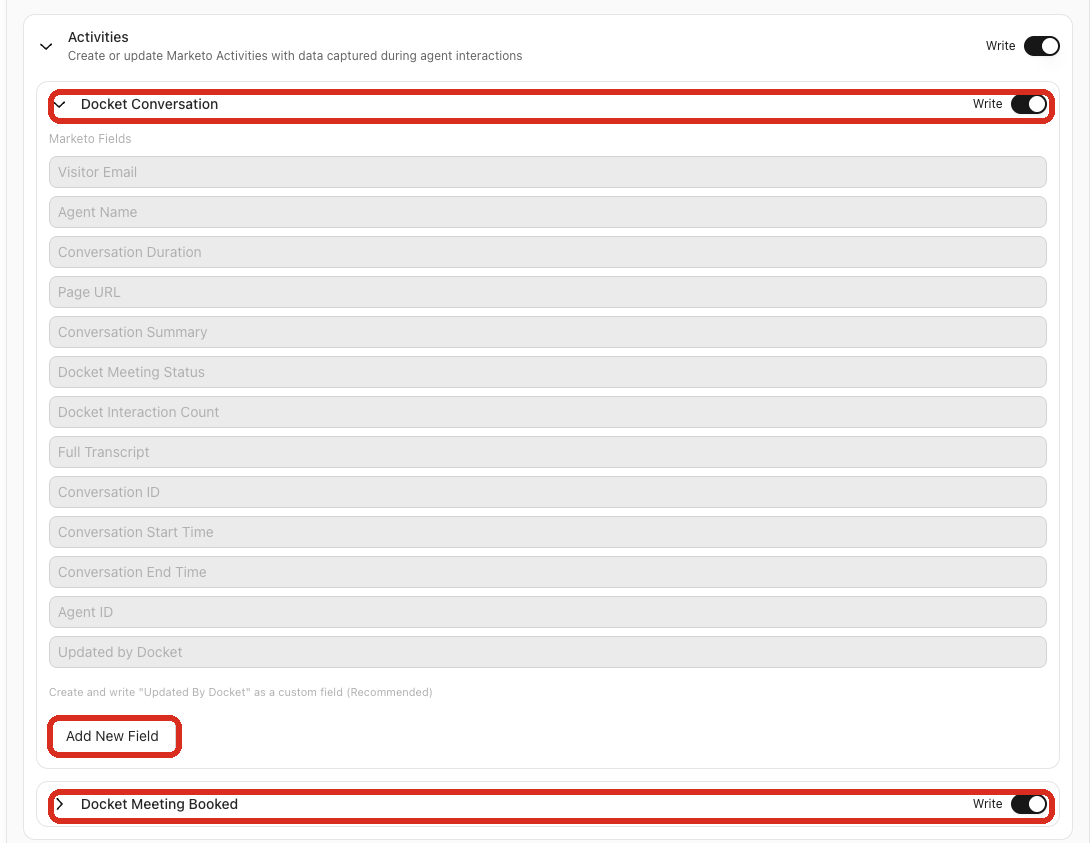
What does Docket write into the Marketo activities?
Two custom activities carry the conversation and the meeting.
Docket Conversation always includes these fields: Visitor Email, Agent Name, Conversation Duration, Page URL, Conversation Summary, Docket Meeting Status, Docket Interaction Count, Full Transcript, Conversation ID, Conversation Start Time, Conversation End Time, Agent ID, and Updated by Docket.
You then choose which optional fields to add: UTM Source, UTM Medium, UTM Campaign, UTM Content, UTM Term, Click ID, Click ID Type, Docket First Interaction, Docket Latest Interaction, Docket Meeting Date, Docket Meeting Owner, and any post-call analysis fields you have configured.
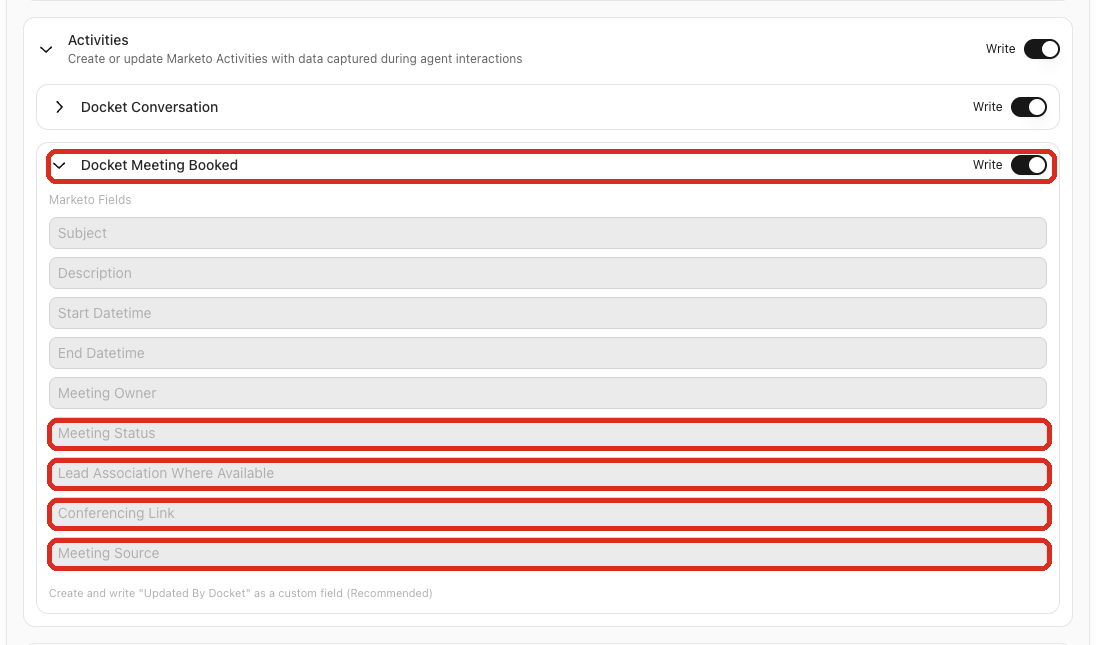
Docket Meeting Booked carries the meeting itself: subject and description, start and end datetime, meeting owner, meeting status of booked, rescheduled, or cancelled, the lead association where available, the conferencing link, a meeting source of "Docket", and the Docket booking and meeting IDs.
Marketo caps a custom activity at 20 attributes. The 13 mandatory fields take 13 of those, which leaves 7 for optional and post-call analysis fields combined. Docket checks this when you save, so a configuration over the limit is caught before it reaches Marketo. If your Marketo admin has added fields to the activity directly, you have fewer slots than you expect, and Docket reports: "Could not save the configuration as the Activity has more than 20 fields configured."
How do I write values to the Marketo Lead record?
Field Updates write straight to the Lead, separately from the activities. Each mapped field uses one of two write modes:
Overwrite always replaces the existing value.
Fill if empty writes only when the field is currently blank.
How do I enroll visitors in a Marketo program?
Program Enrollment adds the visitor as a Program Member at a status you choose, and one trigger can enroll into several programs.
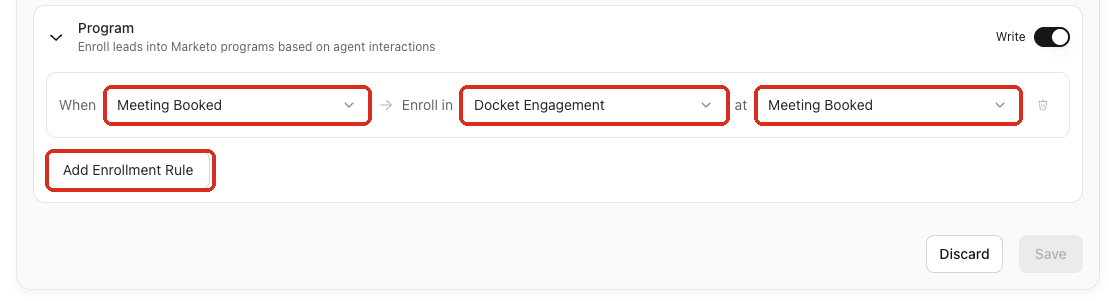
There are three triggers:
On conversation completed, which defaults to the Docket Engagement program at the Engaged status.
On meeting booked, which defaults to the Docket Engagement program at the Meeting Booked status.
Custom criteria, where you describe in your own words when to enroll, for example "enroll if the visitor is from an enterprise company and discussed pricing". Docket evaluates the criteria against the full conversation.
You can choose any other program from the dropdown, and each agent can hold up to five enrollment rules.
How does enrollment behave for a Lead that already exists?
Lead state | What Docket does |
|---|---|
Lead is not in Marketo | Creates the Lead, then enrolls it. |
Lead exists but is not in the program | Enrolls it at the configured status. |
Lead exists at an earlier status | Advances it to the configured status. |
Lead exists at the same or a later status | Leaves it as it is. |
Program no longer exists | Skips the enrollment. |
Status progression only moves forward. Docket never moves a Lead from Meeting Booked back to Engaged.
Frequently asked questions
Why did the Marketo connection fail with a channel error?
Because the Docket channel is missing in Marketo, or one of its progression statuses is not named exactly Engaged and Meeting Booked. Channels cannot be created through the API, so this step is always manual.
Do I have to create the Docket Engagement program myself?
Only if your Marketo instance requires a tag whenever a program is created. Otherwise Docket creates the folder and program for you on first connection, and it adopts an existing program of that name rather than duplicating it.
Can I change the channel on the Docket Engagement program later?
No. The channel and program type are fixed once the program is created, which is why it is worth checking the channel name before you connect.
Why can I not save my activity configuration?
Because the activity is over Marketo's 20-attribute cap. The 13 mandatory fields leave 7 slots, and fields your Marketo admin added directly to the activity count against the same limit.
Where is the Marketo toggle on the agent?
On the Analysis and Actions tab, under Post Call Actions, named Sync to Marketo. The workspace connection in Settings makes Marketo available; this switch decides whether this particular agent writes to it.
Does turning on Marketo for one agent affect the others?
No. Write-back configuration belongs to each agent, so you can pilot it on a single agent before rolling it out.
Can Docket downgrade a Lead's program status?
No. Enrollment only moves forward, so a Lead already at Meeting Booked stays there even if a later conversation would otherwise set Engaged.