Passing Form Data to a Marketing Agent
Last updated: October 26, 2026
When someone fills in your demo request form, they have already told you their name, email and company. Passing those values to Docket before the widget opens means the agent picks up where the form left off instead of asking the same questions again.
The pattern is short: catch the submit event, send the fields you need, then open the widget.
What do you need before you start?
The Docket widget script installed on the page with the form.
A variable configured on the agent for each form field you plan to send. See Setting Up Dynamic Context Ingestion.
A decision about which submitted values the agent actually needs.
Send only what changes the conversation. Passwords, payment details and anything you would not want repeated back out loud do not belong here.
How do you configure the variables?
Sign in to app.docketai.com and open Marketing Agent Configuration.
Select your agent and stay on the Agent tab.
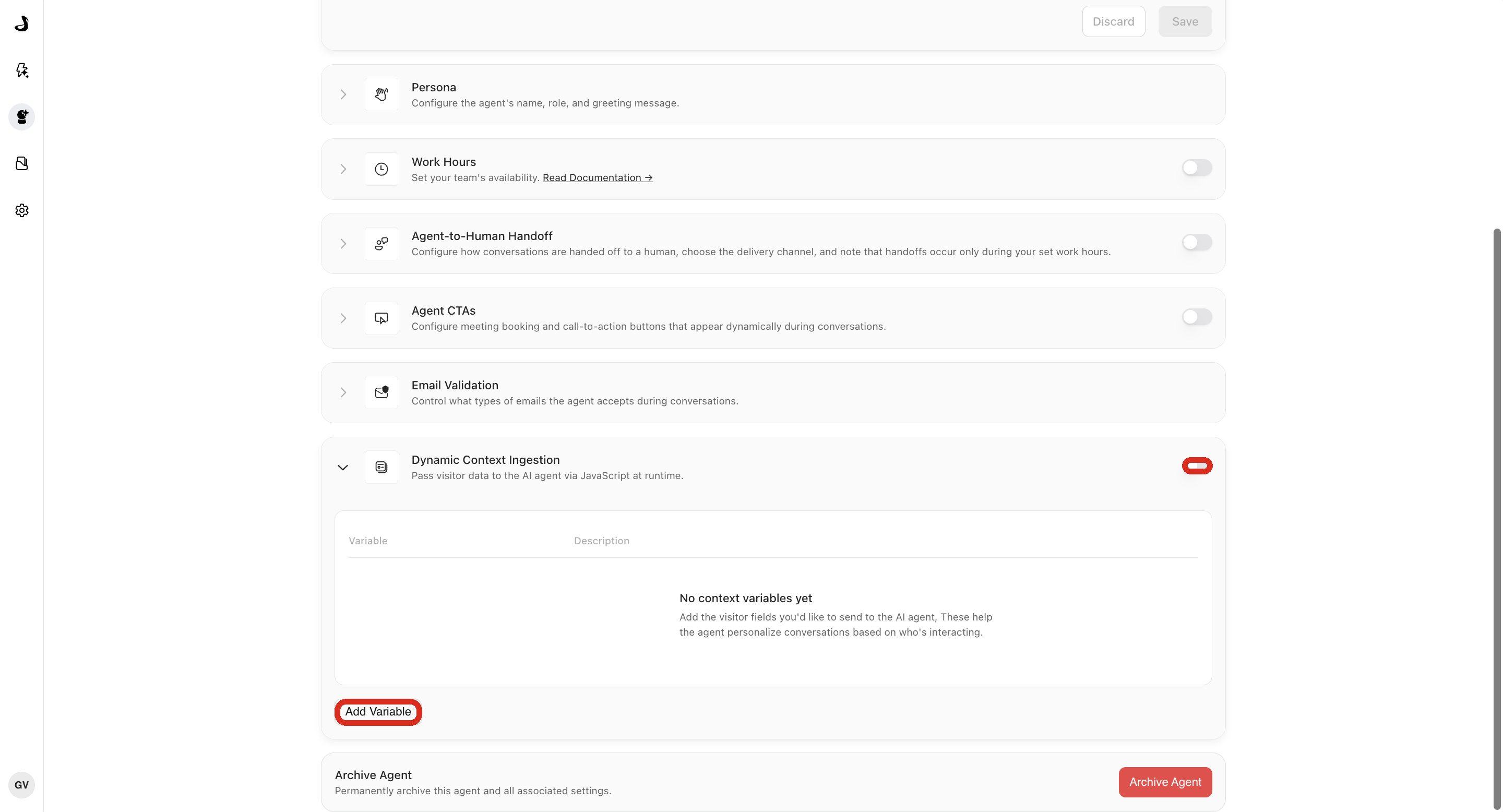
Open Dynamic Context Ingestion and turn the section on.
Select Add Variable, then add one variable per form field. The Variable Name must match the key you will send from JavaScript, character for character.
How do you pass the form fields?
Map each field by name. Do not hand the whole FormData object to setContext(), because file inputs and multi-value fields are not simple values and the call will fail.
<form id="demo-request">
  <input name="name" autocomplete="name" required />
  <input name="email" type="email" autocomplete="email" required />
  <input name="company" autocomplete="organization" />
  <button type="submit">Talk to Sales</button>
</form>

<script>
  document.getElementById("demo-request").addEventListener("submit", async (event) => {
    event.preventDefault();

    if (!window.AISeller?.setContext || !window.AISeller?.showAndConnect) {
      console.warn("The Docket widget is not ready.");
      return;
    }

    const form = new FormData(event.currentTarget);
    const result = await window.AISeller.setContext({
      name: String(form.get("name") || ""),
      email: String(form.get("email") || ""),
      company: String(form.get("company") || "")
    });

    if (!result.success) {
      console.warn("Docket context was not stored:", result.message);
      return;
    }

    window.AISeller.showAndConnect();
  });
</script>
Docket accepts strings, numbers, booleans and null. Convert anything else, such as a checkbox group, into one of those before sending it.
event.preventDefault() is doing real work here. Without it the browser may navigate away before setContext() finishes, and the context is lost. If the form also has to post somewhere, run that submission after the Docket call resolves.
When should you reset the context?
Call resetContext() when the visitor logs out, or when someone else might use the same browser. It clears the pending values so the next conversation starts clean.
await window.AISeller.resetContext();How do you check that it works?
Open the page in a private browser window.
Submit the form with test values.
Confirm
setContext()returnedsuccess: true.Confirm the widget opens and the conversation starts.
Ask the agent something that should use a submitted value.
Reset the context and confirm a new conversation does not reuse the earlier values.
Frequently asked questions
The form submits but the widget never opens. What happened?
Either setContext() returned success: false and your code stopped, or the page navigated before the call finished. Log result.message, and confirm event.preventDefault() runs first.
Why does setContext() fail when I pass the whole form?
A FormData object can hold File entries and repeated values, which are not simple types. Read the fields you need individually, as shown above.
The agent gets the email but not the company. Why?
The key you send does not match the configured variable name. Compare them exactly, including capitalization and underscores.
Can I send a checkbox group?
Not as an array. Join the selected values into one string first, for example tags: selected.join(", "), and say in the variable description how the agent should read it.
My form redirects to a thank-you page. Where should the Docket code go?
Put it on the destination page, or remove the redirect. A redirect can cut the conversation off before it starts.