Selecting Knowledge Sources for an Agent
Last updated: September 29, 2026
Knowledge sources decide what your Marketing Agent can answer from. Picking the right ones is the difference between an agent that sounds like it knows your product and one that guesses.
This guide shows you how to choose sources for a single agent and confirm the agent is using them.
What do I need before I select sources?
- Access to app.docketai.com.
- An existing Marketing Agent.
- The content already added to Knowledge Sources. See Managing Global Knowledge Sources.
How do I choose which sources an agent uses?
- Open Marketing Agent Configuration and select your agent.
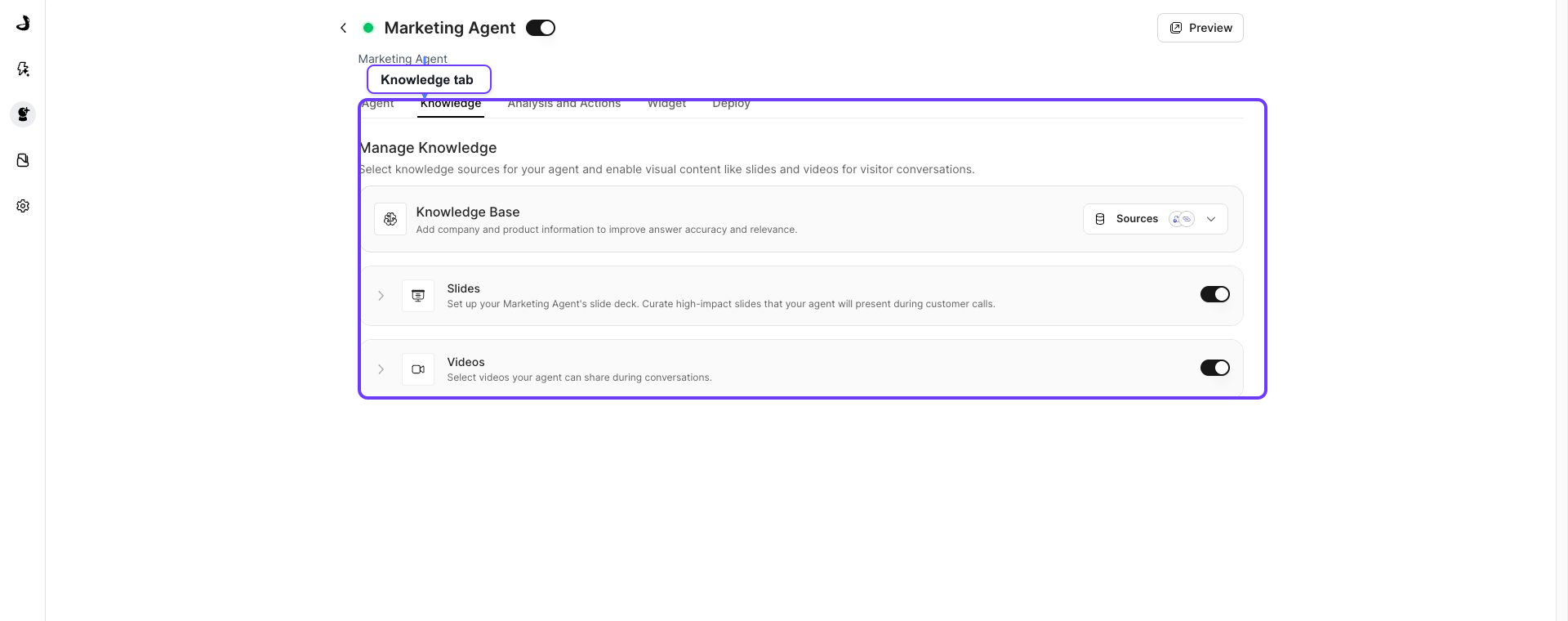
- Open the Knowledge tab.
- In the Knowledge Base row, click Customize Sources.
Why does the picker show groups instead of my files?
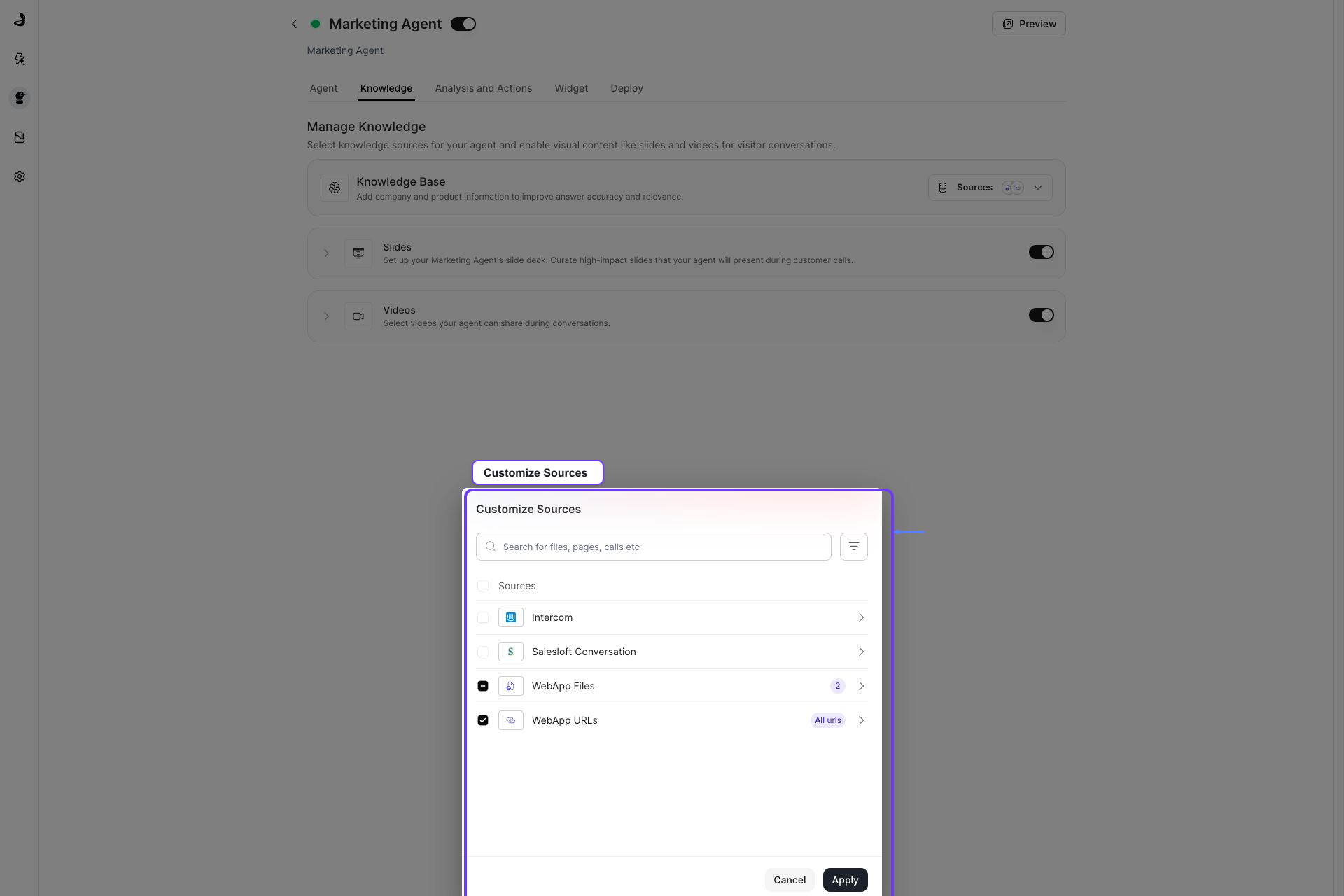
The Customize Sources picker organises content by where it came from, not as one long file list. You will see groups such as WebApp Files for anything uploaded and WebApp URLs for ingested web pages, plus a group for each connected integration.
That means a file you just uploaded appears inside WebApp Files rather than at the top level.
- Tick a group to give the agent everything in it. The group shows a badge such as All files when it is fully selected.
- To choose individual records instead, open the group with the chevron on the right of its row, tick the records you want, and click Save.
- Click Apply to confirm the selection.
Which sources should each agent get?
Match the sources to the job the agent does on the page where it appears.
Agent type | Useful source focus |
|---|---|
Homepage agent | Product overview, positioning, key use cases, and high-level FAQs. |
Pricing or demo agent | Packaging, pricing guidance, qualification, and sales-ready FAQs. |
Technical or implementation agent | Security, integrations, deployment, and setup details. |
Campaign agent | Campaign pages, offers, case studies, and follow-up content. |
More sources are not always better. A focused set usually gives clearer answers than a broad set of loosely related material, because the agent has less to sift through. Leave out content that is outdated, internal-only, or unrelated to the page.
A connected integration does not mean every agent should use everything it syncs. Select only what supports this agent's job.
How do I check the agent is using the right sources?
- Open Preview from the agent header.
- Ask a question that should be answered from a selected source.
- Ask a question that is clearly out of scope, and confirm the agent does not overreach.
- Adjust the selection if answers are too broad, outdated, or missing context.
The selection is right when the agent answers expected questions from your chosen sources and stays within them for everything else.
Frequently asked questions about Docket knowledge sources
I uploaded a file but cannot find it in the picker. Where is it?
Open the WebApp Files group with its chevron. Individual uploaded files live inside that group rather than at the top level of the picker.
What is the difference between ticking a group and opening it?
Ticking the group gives the agent everything in it, including content added later. Opening the group lets you select specific records, which keeps the agent's scope fixed to what you chose.
Does the Internal or External setting decide what the agent can use?
No. For Marketing Agents, the Sharing setting on a file makes no difference to what the agent can answer from. It governs whether a file can be shared outside your organization through a shareable link.
The "Last synced date" in the picker looks very old. Is my source stale?
Not necessarily. That column shows when the source was first added, not when it last refreshed. Check Last Updated in Knowledge Sources for real freshness, and re-sync there if the content has changed.
My agent answered using something I did not select. What should I check?
Open Customize Sources and check whether a whole group is ticked rather than individual records, since a ticked group includes everything inside it. Then confirm the answer is not coming from a second source group covering similar content.
Do I need to reselect sources after adding new content?
Only if you selected individual records. A fully selected group already covers content added to it later.
Can two agents use the same source?
Yes. The workspace library is shared, and each agent selects from it independently, so the same file can serve several agents.