Connecting Zoom for Scheduled Meetings
Last updated: September 22, 2026
Connect Zoom when meetings booked by a Marketing Agent should carry a Zoom link instead of the default conferencing for your calendar.
Zoom handles the conferencing. Your calendar connection still supplies the availability and the host, and Zoom adds the meeting link on top. Connect the calendar first, then Zoom, then choose Zoom on the agent.
Like calendars, Zoom connects in two places. A workspace connection covers every host, and a personal connection covers one person.
Which Zoom connection should I use?
Connection | Where it is set up | What it covers |
|---|---|---|
Zoom (workspace) | Settings then Integrations, by a Docket Admin | Every host the routing picks, without asking each one to connect. |
Zoom (personal) | Settings then Personal Settings, by each person | Only that person. Each host who should get a Zoom link connects their own account. |
The difference matters when a booking fails for one host and works for another. With personal connections, a host who has not connected Zoom cannot be given a Zoom meeting.
What do I need before connecting Zoom?
Have these ready before you start:
A calendar already connected, because Zoom supplies the link rather than the availability. See Connecting Google Calendar for Meeting Routing or Connecting Outlook Calendar for Marketing Agent Meetings.
The Admin role in Docket, for the workspace connection.
A Zoom account that can authorize the connection, and Zoom licensing for the people who will host.
How do I connect Zoom for the whole workspace?
In Docket, open Settings and select the Integrations tab.
Find Zoom and select Connect.
Complete the Zoom authorization with an account that can approve it for your organization.
Confirm the Zoom card shows as connected.
A connected card does not by itself make every host eligible. Where your workspace uses personal Zoom connections, each routed host still needs their own.
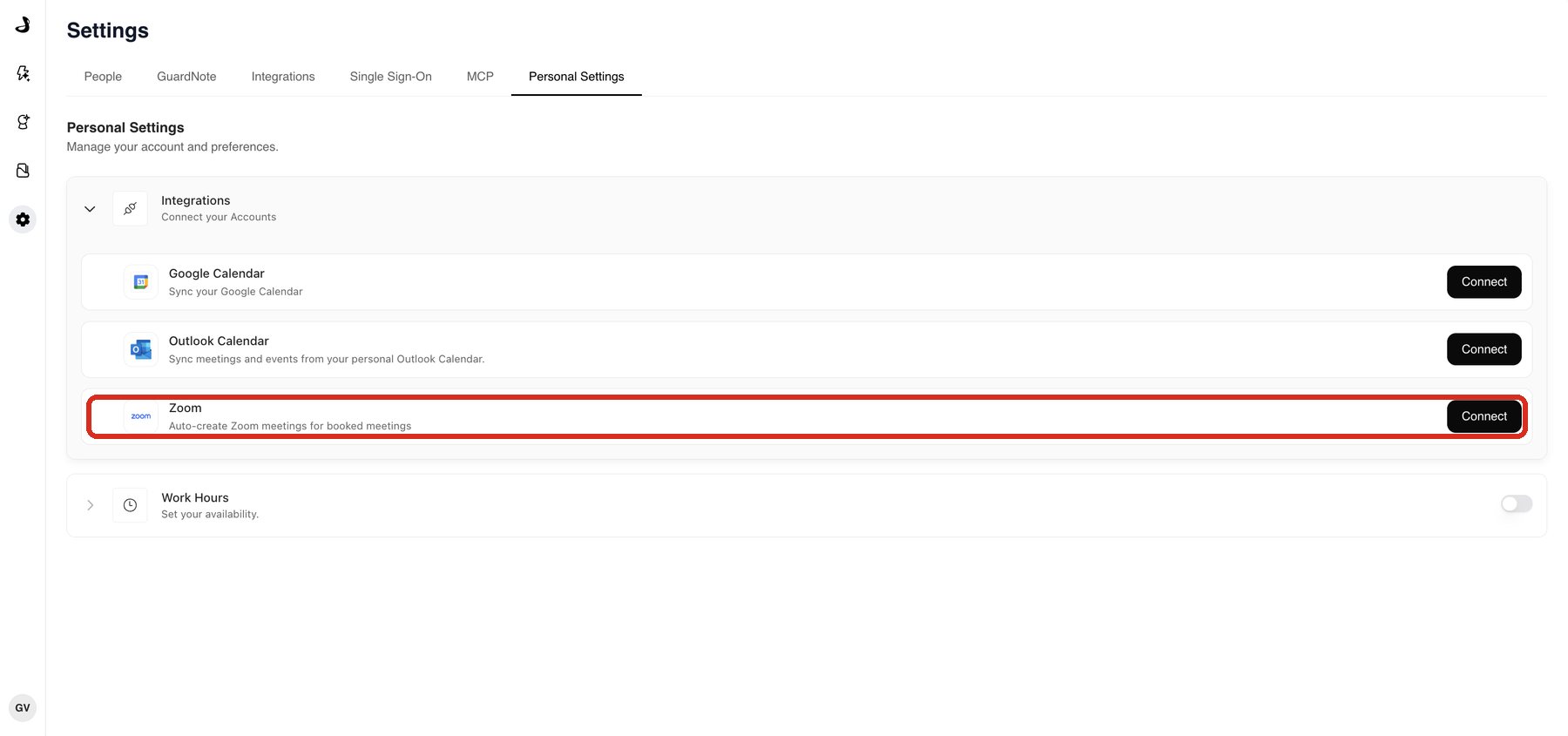
How does each person connect their own Zoom account?
Open Settings and select Personal Settings.
Under Integrations, find Zoom and select Connect.
Sign in with the Zoom account that should host your meetings.
How do I make an agent book Zoom meetings?
Open the agent that books meetings and select the Agent tab.
Expand Agent CTAs.
Next to Meeting booking, select Configure.
Under Docket's Calendar Settings, set Platform to Zoom.
Check Meeting Title, Meeting Description, Duration, and Email Reminders.
Select Save.
The Platform list only offers conferencing tools somebody has already connected. If Zoom is missing, connect it and reopen the meeting booking settings.
How do I check that Zoom booking works?
Confirm both your calendar and Zoom show as connected.
Select Preview at the top right of the agent page.
Start a conversation that should offer a meeting.
Pick a time when a Zoom-eligible host should be free.
Finish the booking with a test email address.
Confirm the calendar invitation carries a Zoom link and the host you expected.
Where your team uses personal Zoom connections, repeat the test with a second routed host. That is the quickest way to find someone who has not connected yet.
Troubleshooting Zoom bookings
What you are seeing | What to check |
|---|---|
The meeting is created without a Zoom link | Confirm the agent's Platform is set to Zoom and the configuration was saved. |
Some hosts get a Zoom link and others do not | With personal Zoom connections, confirm each of those hosts has connected their own Zoom account in Personal Settings. |
Zoom is missing from the Platform list | Nobody has connected Zoom yet. Connect it, then reopen the agent's meeting booking settings. |
No meeting times appear at all | This is a calendar problem rather than a Zoom one. Check the calendar connection, the routing targets, and the hosts' work hours. |
Booking fails for a host who has Zoom | Confirm that host's Zoom licence allows them to be a meeting organizer. |
Frequently asked questions
Do I need Zoom to book meetings at all?
No. Meetings book on your connected calendar with its default conferencing. Zoom is for teams who want the invitation to carry a Zoom link instead.
Does Zoom decide who gets the meeting?
No. Your calendar connection and the agent's routing decide the host and the times. Zoom only supplies the meeting link.
Can different agents use different conferencing tools?
Yes. Platform is set on each agent, so one agent can book Zoom meetings while another uses the calendar's default.
Why does the Zoom card show as connected when a booking still fails?
Because the workspace connection and a person's own connection are different things. Where your workspace relies on personal Zoom connections, a host who has not connected cannot be given a Zoom meeting even though the card is green.
Where do I connect my own Zoom account?
In Settings then Personal Settings, under Integrations.